Over 10 years we help companies reach their financial and branding goals. Engitech is a values-driven technology agency dedicated.

Gallery

Contacts

411 University St, Seattle, USA

engitech@oceanthemes.net

+1 -800-456-478-23

Huaris laser power meter managment software for HS2515-U

Software Huaris Laser Power Meter Management 1.0

레이저 출력 측정을 위한 첨단 소프트웨어의 강력한 성능을 경험해 보세요. Huaris 레이저 파워 미터 소프트웨어를 통해 측정 수준을 한 단계 끌어올릴 수 있습니다. 직관적인 인터페이스와 강력한 기능을 갖춘 이 소프트웨어는 전문가와 숙련 사용자 모두에게 가치 있는 도구입니다.

Huaris 파워 미터 관리 소프트웨어로 레이저의 잠재력 극대화

Huaris 레이저 파워 미터 소프트웨어는 레이저 파워 미터의 성능을 제어하고 모니터링할 수 있도록 직관적인 인터페이스를 제공하도록 설계되었습니다. 사용자는 파워 미터 설정을 쉽게 구성하고, 레이저 출력 측정을 실시간으로 모니터링하며, 추가 처리를 위한 데이터 분석을 수행할 수 있습니다. 또한 자동 교정과 같은 고급 기능을 제공하여 측정 정확도를 높이고 오류 가능성을 줄여줍니다. 더불어 날짜, 시간 및 기타 주요 정보가 포함된 명확하고 편리한 PDF 보고서 형식으로 데이터를 저장할 수 있습니다.

Huaris 비디오 튜토리얼

Huaris 레이저 파워 미터 튜토리얼

Huaris 레이저 파워 미터 및 전용 소프트웨어 사용에 대한 이해도와 숙련도를 높이고 싶으신가요?

본 튜토리얼 영상에서는 Huaris 레이저 파워 미터와 강력한 소프트웨어의 기술적 요소를 심층적으로 다룹니다. 레이저 출력을 정확하게 측정하는 방법, 정밀한 판독을 위한 교정 방법, 레이저 출력 데이터의 효과적인 분석, 그리고 소프트웨어 사용 중 발생할 수 있는 문제 해결 방법을 확인하실 수 있습니다.

튜토리얼 영상을 시청하면 레이저 파워 미터 소프트웨어를 최대한 활용하는 데 필요한 실질적인 인사이트를 얻을 수 있습니다. 주요 기능 최적화, 고급 기능 활용, 레이저 출력 측정 시 자주 발생하는 문제 해결 방법을 배워보세요.

레이저 파워 미터 기술에 대한 이해를 확장할 수 있는 이 기회를 놓치지 마세요. 지금 튜토리얼을 시청하고 정확한 출력 측정, 데이터 분석, 소프트웨어 문제 해결의 핵심을 확인하세요.

Huaris 레이저 파워 미터의 모든 잠재력을 활용하고 숙련된 사용자로 성장해 보세요. YouTube 채널에 참여하여 레이저 출력 측정 분야에서 전문성을 높이기 위한 지식과 기술을 습득하세요.

// 문의하세요! 24시간 언제든지 질문에 답변해 드립니다

상담이 필요하신가요?

일반 설정

일반 설정 섹션의 기본 기능

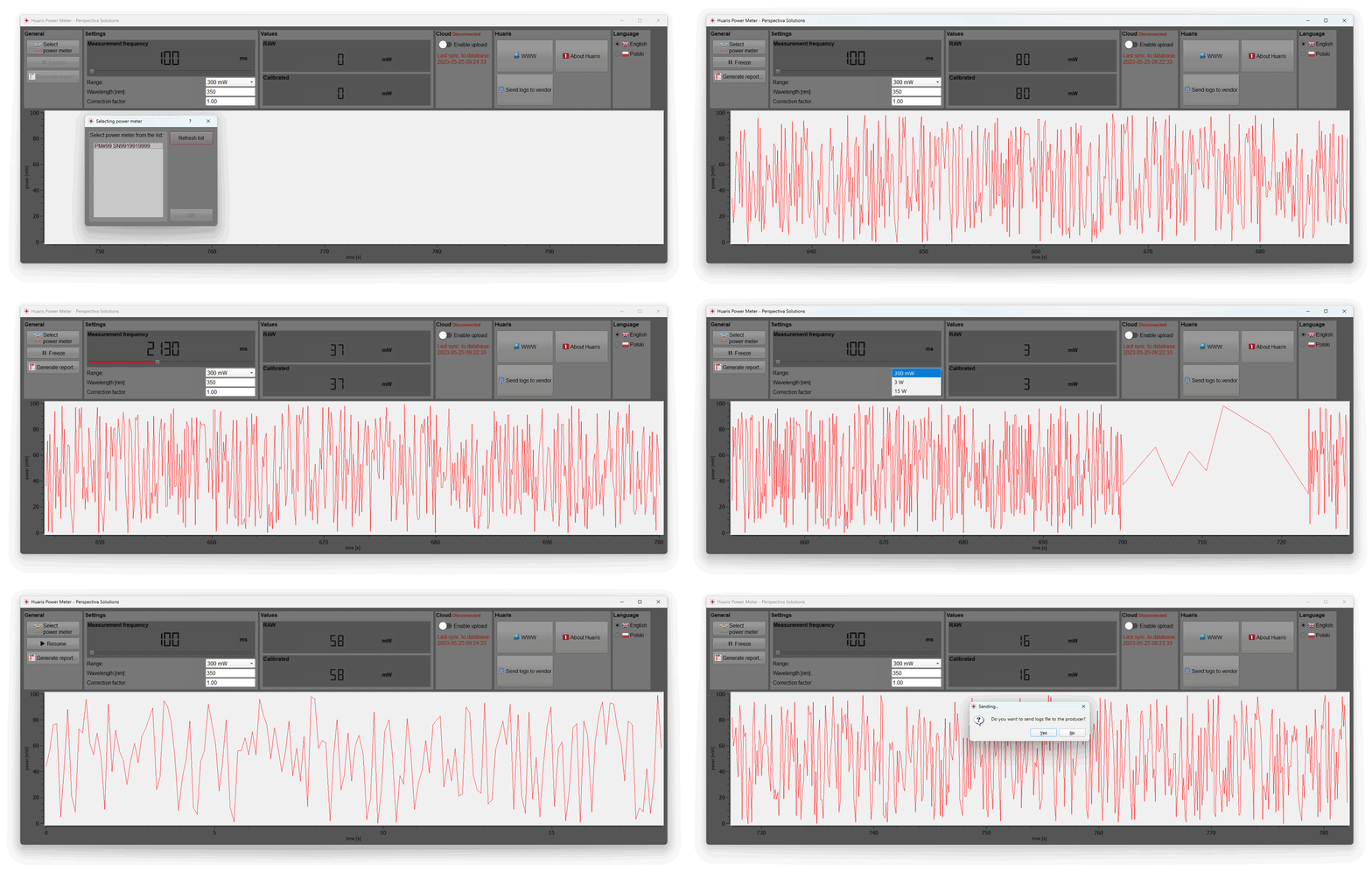
Huaris 레이저 파워 미터 소프트웨어의 일반 설정 섹션에서는 레이저 파워 미터 장치를 선택할 수 있습니다. 정확하고 신뢰할 수 있는 출력 측정을 위해 고품질 장치 라인업 중에서 원하는 파워 미터를 선택하세요.

언제든지 측정 정지

첫 번째로 살펴볼 기능은 “Freeze”입니다. 이 기능을 사용하면 언제든지 측정을 일시 정지하고 나중에 다시 재개할 수 있습니다. 또한 소프트웨어 화면에 표시된 측정 데이터를 기반으로 PDF 보고서를 생성할 수 있습니다.

PDF 보고서 생성

소프트웨어에 표시된 측정 데이터를 포함한 상세한 PDF 보고서를 생성하는 과정을 확인하세요. 이 기능을 통해 출력 측정 데이터를 정확하고 편리하게 기록하고 분석할 수 있습니다.

파워 미터 기본 설정

설정 최적화를 통한 측정 제어

Huaris 레이저 파워 미터 관리 소프트웨어의 설정 최적화 기능을 통해 측정을 완벽하게 제어하세요. 측정 제어 옵션을 세밀하게 조정하여 정밀하고 정확한 출력 값을 확보하고, 레이저 파워 미터의 최적 성능을 보장합니다.

측정 주기

“Settings” 섹션에서는 여러 설정을 변경할 수 있습니다. 먼저 측정 주기를 조정하여 출력 값이 기록되는 빈도를 설정할 수 있습니다. 예를 들어 500밀리초로 설정하면 이후 섹션에서 0.5초마다 새로운 값이 표시되고 그래프에 추가됩니다.

파장 교정을 통한 정확한 출력 측정

Huaris 레이저 파워 미터 관리 소프트웨어의 파장 기능을 활용하여 레이저 파워 미터를 특정 파장에 맞게 교정하고, 레이저 특성에 최적화된 정밀한 출력 측정을 수행하세요.

출력 측정 범위

출력 측정 범위도 선택할 수 있으며, 300밀리와트부터 15와트까지의 옵션이 제공됩니다. 정확한 측정을 위해 적절한 범위를 선택하는 것이 중요합니다. 또한 정밀한 측정을 위해 레이저의 파장을 반드시 지정해야 합니다.

보정 계수

주요 기능 중 하나는 “Correction Factor(보정 계수)”입니다. 이 계수는 측정 헤드에서 제공되는 값을 보정하는 데 사용됩니다. 상단의 “Row” 값은 헤드에서 전달되는 원시 값이며, 보정 계수를 곱하면 교정된 출력 값을 얻을 수 있습니다. 이 기능은 빔 스플리터 사용 시 특히 유용하며, 레이저에서 실제로 방출되는 정확한 출력을 확인할 수 있습니다.

AI 클라우드 분석 통합

Huaris AI 클라우드로 레이저 출력 데이터 분석

측정 데이터를 Huaris 클라우드 플랫폼으로 전송하는 옵션을 확인해 보세요. 장기 데이터 저장, AI 분석, 편리한 알람 알림 기능을 통해 데이터 활용 가능성을 극대화할 수 있습니다. Huaris 클라우드에 연결하면 장기 데이터 저장, AI 분석, 알람 기능 등 확장된 기능을 사용할 수 있으며, 고급 AI 알고리즘을 통해 레이저 출력 데이터를 분석할 수 있습니다.

강력한 인사이트 확보: Huaris AI 클라우드 시스템으로 레이저 출력 데이터 분석

Huaris AI 클라우드는 강력한 데이터 분석 기능을 제공하여 유의미한 인사이트를 도출하고, 패턴을 식별하며, 레이저 출력 측정을 최적화할 수 있도록 지원합니다. 출력 데이터에 대한 심층 분석을 통해 트렌드를 파악하고 측정 결과에 대한 가치 있는 정보를 얻을 수 있습니다.

Huaris AI 클라우드의 AI 기반 분석 기능으로 레이저 출력 측정을 한 단계 끌어올리세요. AI 분석을 통해 의미 있는 정보를 추출하고 레이저 성능을 더욱 정밀하고 효율적으로 최적화할 수 있습니다.

단, 이러한 기능을 완전히 활용하려면 파워 미터가 클라우드 시스템에 등록되어 있어야 합니다.

// 레이저 출력 측정

Huaris 레이저 파워 미터 소프트웨어 사용 시 장점

Huaris 레이저 파워 미터 소프트웨어를 사용하면 다음과 같은 장점을 누릴 수 있습니다.

  • 정확한 출력 측정: Huaris 소프트웨어는 정밀하고 신뢰할 수 있는 측정을 제공하여 레이저 시스템의 출력 값을 정확하게 확인할 수 있습니다.

  • 고급 데이터 분석: 강력한 데이터 분석 기능을 통해 레이저 출력 데이터를 효과적으로 분석하고 해석할 수 있습니다. 출력 트렌드, 변동 및 레이저 성능 특성을 파악할 수 있습니다.

  • 사용자 맞춤 설정: 측정 주기, 범위 선택, 보정 계수 등 다양한 설정을 사용자 요구에 맞게 조정하여 최적의 측정 결과를 얻을 수 있습니다.

  • PDF 보고서 생성: 소프트웨어에서 직접 상세한 PDF 보고서를 생성하여 데이터 분석, 공유 및 기록 관리에 활용할 수 있습니다.

  • 완벽한 통합: Huaris 소프트웨어는 Huaris 클라우드 플랫폼과 원활하게 연동되어 장기 데이터 저장, AI 분석, 알람 등 추가 기능을 제공합니다.

  • 사용자 친화적 인터페이스: 직관적이고 사용하기 쉬운 인터페이스로 소프트웨어 학습 시간을 줄이고 출력 측정에 집중할 수 있습니다.

  • 문제 해결 및 지원: 문제 발생 시 Huaris의 전담 고객 지원을 통해 신속하게 도움을 받을 수 있습니다.

  • 지속적인 업데이트: 정기적인 소프트웨어 업데이트를 통해 최신 기능과 성능 개선 사항을 지속적으로 제공합니다.

// FAQ 레이저 파워 및 에너지 미터

레이저 출력 장치 및 소프트웨어에 대한
자주 묻는 질문 보기

What are the advantages of using software for laser power meter data management?

Using software for laser power meter data management offers several advantages. Firstly, it allows for efficient organization and storage of measurement data, making it easy to access and analyze. Secondly, software provides advanced data processing capabilities, enabling you to generate reports, perform data comparisons, and extract valuable insights. Additionally, software often integrates with other tools and systems, facilitating seamless workflow integration and enhancing overall efficiency in laser power measurement processes.

What is laser power meter software and how does it work?

Laser power meter software is a specialized program that is designed to work in conjunction with a laser power meter device. It enhances the functionality and capabilities of the power meter by providing advanced data analysis, visualization, and control features.

The software typically communicates with the laser power meter through a connection interface, such as USB or Ethernet. It allows users to view real-time measurements of laser power, monitor power fluctuations, and record data for further analysis.

One of the key functions of laser power meter software is data logging. It enables users to capture and store power measurements over time, allowing for long-term monitoring and analysis of power trends. The software may offer options to export the data in various formats for further processing or integration with other software tools.

Moreover, laser power meter software often provides additional features such as calibration, correction factors, and measurement settings customization. Users can calibrate the power meter using known reference standards to ensure accurate measurements. Correction factors can be applied to account for factors like beam shape or wavelength. The software also enables users to adjust measurement parameters, such as sampling rate or power range, based on their specific needs.

Furthermore, the software may offer graphical representations of power data, including real-time plots, histograms, or power profiles. These visualizations help users analyze power distributions, identify abnormalities, and make informed decisions regarding laser performance and safety.

Overall, laser power meter software plays a crucial role in maximizing the functionality and usability of laser power meter devices. It enables users to effectively monitor, analyze, and control laser power measurements, providing valuable insights for research, industrial applications, and laser safety compliance.

Which laser power meter software is the best for measuring power accurately?

The best laser power meter software for measuring power accurately depends on various factors, including the specific requirements of the user and the compatibility with the laser power meter device being used. There are several reputable software options available in the market that are known for their accuracy and reliability.

One highly regarded software is the Huaris laser power meter software. It is specifically designed to work seamlessly with Huaris laser power meter devices and offers advanced features for precise power measurements. The software provides a user-friendly interface, allowing for easy navigation and control of the power meter functionalities. It offers real-time monitoring of power measurements, data logging capabilities, and the generation of detailed reports.

What are the key features to look for in laser power meter software?

When looking for laser power meter software, there are several key features to consider:

1. Compatibility: Ensure that the software is compatible with your specific laser power meter device to ensure seamless integration and accurate measurements.

2. User-Friendly Interface: Look for software with an intuitive and easy-to-use interface, allowing for efficient navigation and control of the power meter functionalities.

3. Real-Time Monitoring: The software should provide real-time measurement capabilities, allowing you to monitor power levels continuously and make necessary adjustments.

4. Data Logging and Reporting: Look for software that offers data logging capabilities, allowing you to record and analyze power measurements over time. The ability to generate detailed reports with measurement data is also beneficial.

5. Customization Options: The software should provide flexibility in customizing measurement settings, such as frequency and range, to meet specific measurement requirements.

6. Calibration and Correction: Some software offers calibration features to ensure accurate power measurements. Look for software that allows for correction factors and compensation for various parameters.

7. Integration and Compatibility: Consider whether the software can integrate with other tools or platforms, such as cloud storage or analysis software, to enhance data management and analysis capabilities.

By considering these key features, you can select laser power meter software that meets your specific needs and enables accurate and efficient power measurements.

How to calibrate a laser power meter using software?

Calibrating a laser power meter using software typically involves the following steps:

1. Connect the power meter to the computer: Ensure that the power meter is properly connected to the computer via USB or any other supported interface.

2. Launch the software: Open the laser power meter software on your computer.

3. Access the calibration settings: Navigate to the calibration settings or options within the software. It may be under a dedicated menu or settings section.

4. Prepare a reference source: Have a known and stable laser or power source available as a reference for calibration. This reference source should have a well-documented power output.

5. Start the calibration process: Follow the instructions provided by the software to initiate the calibration process. This usually involves directing the power meter to the reference source and capturing the measurement.

6. Compare and adjust: The software will compare the measured value from the power meter with the known value of the reference source. Based on the comparison, the software may suggest or allow you to adjust calibration factors or coefficients.

7. Finalize calibration: Once the necessary adjustments have been made, save or apply the calibration settings within the software.

8. Verify calibration: After calibration, it is recommended to verify the accuracy of the power meter by measuring known power sources to ensure reliable and accurate measurements.

Note: The specific calibration process may vary depending on the laser power meter and software you are using. It is essential to consult the user manual or documentation provided by the manufacturer for detailed instructions on calibrating your specific laser power meter using the software.

How to analyze and visualize laser power data with software?

Analyzing and visualizing laser power data with software typically involves the following steps:

1. Import or load data: Use the software to import or load the laser power data you want to analyze. This data can be in various formats, such as CSV, Excel, or directly captured from the power meter.

2. Explore data visualization options: The software should provide various visualization tools and options, such as line graphs, histograms, or scatter plots. Explore these options to choose the most suitable visualization for your data.

3. Customize visualizations: Customize the visualizations by adjusting parameters like axes labels, colors, or data grouping. This helps in highlighting specific patterns or trends in the data.

4. Apply data analysis techniques: Utilize built-in analysis functions within the software, such as statistical calculations, averaging, or trend analysis. Apply these techniques to extract valuable insights from the laser power data.

5. Generate reports: Generate comprehensive reports summarizing the analyzed data and its visual representations. These reports can be saved or exported in different formats for further sharing or documentation purposes.

6. Compare and interpret results: Compare different datasets, analyze trends, and interpret the results to draw meaningful conclusions about the laser’s power performance or any relevant parameters.

7. Perform further analysis if needed: If the initial analysis raises additional questions or requires deeper investigation, use advanced analysis tools provided by the software or export the data to other specialized data analysis software.

Note: The specific analysis and visualization capabilities may vary depending on the laser power meter software you are using. It is recommended to consult the user manual or documentation provided by the software manufacturer for detailed instructions on analyzing and visualizing laser power data using their software.

Can laser power meter software integrate with other measurement devices?

Yes, laser power meter software can often integrate with other measurement devices. Integration capabilities may vary depending on the specific software and devices involved. However, many laser power meter software packages are designed to be compatible with various measurement instruments and devices, such as oscilloscopes, spectrometers, or beam profilers. This integration allows for synchronized data acquisition, combined analysis of multiple measurements, or even automated workflows between different instruments. It is advisable to consult the software documentation or contact the software provider to understand the integration options and compatibility with specific measurement devices.

What are the compatibility requirements for laser power meter software?

The compatibility requirements for laser power meter software may vary depending on the specific software. However, Huaris laser power meter is compatible with Windows operating system and utilizes a USB interface for seamless connectivity and data transfer. This ensures that users can easily connect their Huaris laser power meter to their Windows-based systems and utilize the software to measure and analyze laser power accurately.

What is a laser power meter and how does it work?

A laser power meter is a device used to measure the power or energy output of a laser beam. It works by capturing the laser beam and converting its energy into an electrical signal, which is then measured and displayed as a power value. Laser power meters employ various techniques such as thermopiles, photodiodes, or pyroelectric sensors to accurately measure the power of the laser beam. These devices are essential for ensuring proper laser performance, monitoring laser output, and optimizing laser applications across various industries.

How to choose the right laser power meter for my needs?

Choosing the right laser power meter requires considering several factors. First, determine the power range of your laser system to ensure the meter can handle the desired power levels. Next, consider the wavelength of your laser, as power meters are designed to work within specific wavelength ranges. Additionally, assess the measurement speed, accuracy, and resolution required for your application. Consider the type of detector technology, such as thermopiles or photodiodes, and whether you need a handheld, benchtop, or integrated system. Finally, take into account any specific features or accessories needed, such as data logging, connectivity options, or software compatibility. Evaluating these factors will help you select a laser power meter that meets your specific needs and provides accurate and reliable power measurements.

What are the benefits of using a laser power meter?

Using a laser power meter offers several benefits. Firstly, it allows you to accurately measure the power output of your laser, ensuring its performance meets the desired specifications. This is crucial for maintaining consistent and reliable results in various applications, including research, manufacturing, and medical procedures.

Secondly, a laser power meter helps you optimize the efficiency of your laser system. By monitoring the power output, you can identify any fluctuations or deviations that may indicate issues with the laser’s performance or alignment. This enables you to take corrective measures promptly, minimizing downtime and maximizing productivity.

Furthermore, a laser power meter provides valuable data for calibration and quality control purposes. You can compare the measured power output against the expected values, ensuring your laser operates within the desired range. This helps in maintaining the accuracy and precision of your laser system, which is particularly important in applications such as laser material processing and scientific experiments.

In summary, using a laser power meter offers the benefits of accurate power measurement, performance optimization, and quality control, contributing to improved efficiency, reliability, and precision in laser-based applications.

What are the key features to consider when purchasing a laser power meter?

When purchasing a laser power meter, there are several key features to consider:

1. Power Range: Ensure that the power meter can accurately measure the power levels within your specific range of interest. It should have a wide dynamic range and be capable of measuring both low and high power outputs.

2. Wavelength Compatibility: Verify that the power meter is compatible with the wavelength(s) of your laser. Different lasers emit light at specific wavelengths, and the power meter should be designed to measure power at those wavelengths accurately.

3. Measurement Accuracy: Look for a power meter with high accuracy and precision to ensure reliable and trustworthy measurements. Consider the specifications related to accuracy, uncertainty, and resolution provided by the manufacturer.

4. Response Time: The power meter’s response time determines how quickly it can provide accurate power readings. For lasers with rapid fluctuations or pulsed operation, a fast response time is crucial to capture the power variations accurately.

5. Data Logging and Connectivity: Check if the power meter offers data logging capabilities to record and analyze power measurements over time. Additionally, consider the connectivity options available, such as USB, Bluetooth, or wireless, to facilitate data transfer and integration with other devices or software.

6. User Interface: Evaluate the user interface of the power meter, ensuring it is intuitive and easy to navigate. Look for features like a clear display, accessible controls, and user-friendly software for efficient operation and data interpretation.

7. Calibration and Maintenance: Consider the availability of calibration services and the recommended calibration interval for the power meter. Additionally, assess the ease of maintenance and the availability of technical support from the manufacturer.

By considering these key features, you can make an informed decision and choose a laser power meter that meets your specific requirements, ensuring accurate and reliable power measurements for your laser system.

What are the common troubleshooting issues with laser power meters?

When using laser power meters, you may encounter some common troubleshooting issues. Here are a few examples:

1. Inconsistent Readings: If you notice inconsistent or fluctuating readings, check for any loose connections between the power meter and the laser source. Ensure that the optical components, such as the attenuator or beam sampler, are properly aligned and clean. Additionally, verify if there are any environmental factors affecting the stability of the laser beam, such as temperature or vibrations.

2. Zero Power Readings: If the power meter consistently displays zero power readings, ensure that the power meter is receiving an appropriate power input. Check the power source, cables, and connections to confirm proper power delivery. Additionally, inspect the detector surface for any contamination or damage that may be affecting its sensitivity.

3. Calibration Issues: If you suspect calibration issues, first check if the power meter is within the recommended calibration period. Consider sending the power meter to an accredited calibration laboratory for recalibration if necessary. It’s also essential to follow the manufacturer’s calibration instructions and procedures accurately.

4. Software Compatibility: If you experience difficulties with the power meter software, ensure that your computer meets the software’s system requirements. Verify if you have installed the latest software version provided by the manufacturer. In case of persistent issues, contact the manufacturer’s technical support for assistance.

5. Unusual Error Messages: If you encounter error messages or warnings displayed by the power meter or software, consult the user manual or documentation for guidance. The error message may indicate specific issues like communication errors, sensor overload, or out-of-range measurements. Follow the recommended troubleshooting steps provided by the manufacturer.

In any troubleshooting situation, it’s recommended to refer to the user manual or contact the manufacturer’s technical support for detailed guidance. They can provide specific troubleshooting steps based on the particular model and help resolve any issues you may encounter with your laser power meter.

Can a laser power meter be used for different types of lasers?

Yes, laser power meters can be used for different types of lasers. However, it is important to consider the specifications and compatibility of the power meter with the specific laser you intend to measure.

When choosing a laser power meter, ensure that it supports the wavelength range of your laser. Laser power meters are designed to work with specific wavelength ranges, so it’s crucial to select a power meter that is compatible with your laser’s wavelength.

Additionally, consider the power range of your laser. Laser power meters have different power measurement capabilities, and it’s essential to choose a power meter that can accurately measure the power levels of your laser. Ensure that the power meter’s maximum power rating is higher than the power output of your laser to avoid any damage to the power meter.

Furthermore, take into account the beam size and shape of your laser. Some power meters are designed to measure the power of a specific beam size or shape, while others offer adjustable apertures or beam profiling capabilities. Choose a power meter that can accommodate the beam size and shape of your laser for accurate measurements.

Lastly, consider the type of laser you are using, such as continuous wave (CW) lasers or pulsed lasers. Different power meters are optimized for specific laser types, so select a power meter that is suitable for the type of laser you are working with.

By considering these factors and ensuring compatibility, you can effectively use a laser power meter for different types of lasers, allowing you to accurately measure and monitor their power output.

Are there any software tools for automating laser power measurements?

Yes, there are software tools available for automating laser power measurements. These tools are designed to streamline the measurement process and increase efficiency. They often offer features such as scheduled measurements, data logging, and automated data analysis. By leveraging these tools, you can save time and ensure consistent and accurate measurements.

How to troubleshoot common issues with laser power meter software?

If you encounter common issues with laser power meter software, here are a few troubleshooting steps you can take:

1. Check the connections: Ensure that the power meter is properly connected to the computer via USB and that all connections are secure.

2. Update the software: Make sure you have the latest version of the software installed. Check for updates on the manufacturer’s website and install any available patches or fixes.

3. Restart the software and device: Close the software, disconnect the power meter, and restart both the software and the device. This can often resolve minor software glitches.

4. Verify compatibility: Ensure that your operating system meets the software’s compatibility requirements. Some software may only work with specific versions of Windows or other operating systems.

5. Contact support: If the issue persists, reach out to the software manufacturer’s support team for assistance. They can provide further guidance and troubleshooting steps specific to the software.

Remember to consult the user manual or documentation provided with the software for additional troubleshooting tips and instructions.

Contact Us

We would be grateful for your feedback about the product. Also, if you would like to receive quotation for our product, please use the contact form below.

Our Office in Poland

Perspectiva Solutions
Młyńska 27 St.
22-400 Zamość, Poland

We work on working days CET (Central European Standard Time) in the following hours:

Md. – Fr. 8:00 – 16:00
Sat. – Sun. – Closed

Free Consultation

Huaris inquiries:
Phone inquiries:

Our distributors

    Query for Huaris system: