






Over 10 years we help companies reach their financial and branding goals. Engitech is a values-driven technology agency dedicated.

Gallery

Contacts

411 University St, Seattle, USA

engitech@oceanthemes.net

+1 -800-456-478-23

Huaris laser power meter managment software for HS2515-U

Software Huaris Laser Power Meter Management 1.0

Découvrez la puissance d’un logiciel avancé pour les mesures de puissance laser. Avec le logiciel Huaris Laser Power Meter, vous pouvez porter vos mesures à un niveau supérieur. Son interface intuitive et ses fonctionnalités robustes en font un outil précieux pour les professionnels comme pour les utilisateurs avertis.

Maximiser le potentiel de votre laser avec le logiciel de gestion Huaris Power Meter

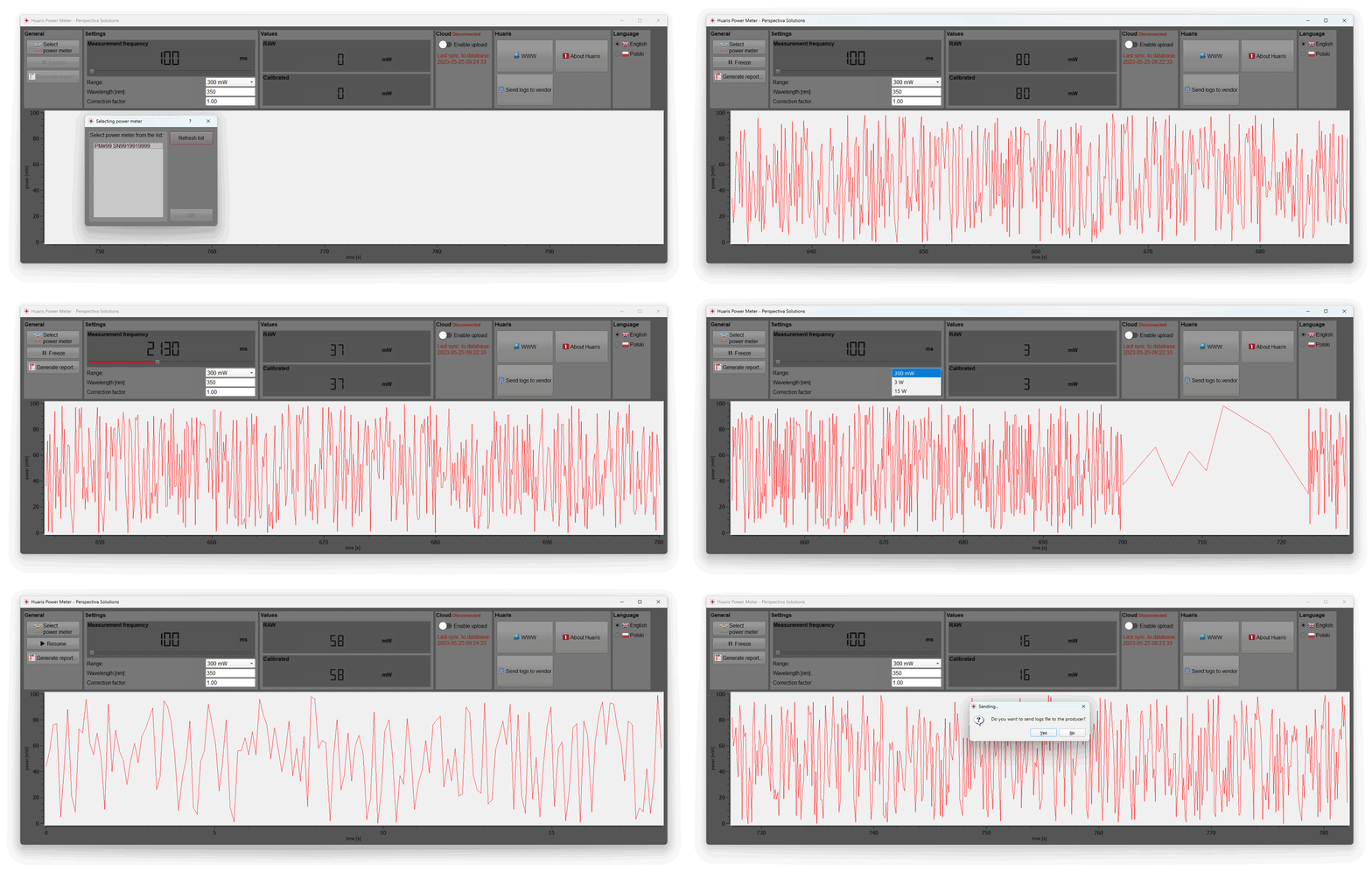
Le logiciel du wattmètre laser Huaris est conçu pour offrir une interface intuitive permettant de contrôler et de surveiller les performances du wattmètre laser. Grâce à ce logiciel, les utilisateurs peuvent facilement configurer les paramètres du wattmètre, surveiller les mesures de puissance en temps réel et analyser les données pour un traitement ultérieur. Le logiciel propose également des fonctionnalités avancées telles que l’étalonnage automatique, permettant d’obtenir des mesures plus précises et de réduire les risques d’erreurs. De plus, le logiciel permet d’enregistrer les données sous forme de rapports PDF clairs et pratiques, incluant la date, l’heure et d’autres informations clés.

Tutoriel vidéo Huaris

Tutoriel du wattmètre laser Huaris

Souhaitez-vous améliorer vos connaissances et votre maîtrise de l’utilisation du wattmètre laser Huaris et de son logiciel associé ?

Dans cette vidéo tutorielle, nous explorons en détail les aspects techniques du wattmètre laser Huaris et de son puissant logiciel. Découvrez comment mesurer la puissance avec précision, étalonner le wattmètre laser pour des lectures fiables, analyser efficacement les données de puissance laser et résoudre les éventuels problèmes liés au logiciel.

En regardant notre vidéo tutorielle, vous obtiendrez des informations précieuses pour exploiter pleinement le potentiel du logiciel du wattmètre laser. Apprenez à optimiser ses fonctionnalités, à tirer parti des options avancées et à surmonter les défis courants liés aux mesures de puissance laser.

Ne manquez pas cette occasion d’approfondir votre compréhension de la technologie des wattmètres laser. Regardez le tutoriel dès maintenant pour découvrir les clés d’une mesure précise de la puissance, de l’analyse des données et du dépannage du logiciel du wattmètre laser.

Libérez tout le potentiel de votre wattmètre laser Huaris et devenez un utilisateur expert. Rejoignez-nous sur notre chaîne YouTube et développez vos connaissances et compétences pour exceller dans les mesures de puissance laser.

// Contactez-nous ! Nous sommes disponibles 24h/24 et 7j/7 pour répondre à vos questions

BESOIN D’UNE CONSULTATION ?

Paramètres généraux

Fonctions de base dans la section des paramètres généraux

Dans la section Paramètres généraux du logiciel Huaris Laser Power Meter, vous avez la possibilité de sélectionner votre appareil – le wattmètre laser. Choisissez le wattmètre adapté parmi notre gamme d’appareils de haute qualité afin de garantir des mesures de puissance précises et fiables.

Fonction Freeze à tout moment

Le premier bouton que nous abordons s’appelle « Freeze ». Cette fonction vous permet de mettre la mesure en pause à tout moment et de la reprendre ultérieurement. De plus, vous avez la possibilité de générer un rapport PDF présentant les données de mesure visibles dans le logiciel.

Génération de rapports PDF

Découvrez le processus de génération de rapports PDF détaillés contenant les données de mesure affichées dans le logiciel. Cette fonctionnalité vous permet de documenter et d’analyser vos mesures de puissance de manière précise et pratique.

Paramètres de base du wattmètre

Contrôle des mesures grâce à l’optimisation des paramètres

Prenez le contrôle total de vos mesures : maîtrisez l’optimisation des paramètres dans le logiciel Huaris Laser Power Meter Management. Ajustez finement les options de contrôle afin d’obtenir des mesures de puissance précises et fiables, garantissant des performances optimales de votre wattmètre laser.

Fréquence de mesure

Dans la section « Paramètres », vous pouvez effectuer plusieurs ajustements. Tout d’abord, vous pouvez régler la fréquence de mesure, déterminant la fréquence d’enregistrement de la puissance. Par exemple, un réglage de 500 millisecondes signifie qu’une nouvelle valeur sera affichée toutes les demi-secondes dans la section suivante et ajoutée au graphique.

Mesure précise de la puissance grâce à l’étalonnage de la longueur d’onde

Découvrez la fonctionnalité de longueur d’onde dans le logiciel Huaris Laser Power Meter Management. Étalonnez votre wattmètre laser en fonction de longueurs d’onde spécifiques afin d’obtenir des mesures de puissance précises, adaptées aux caractéristiques de votre laser.

Plage de mesure de la puissance

Vous pouvez également sélectionner la plage de mesure de la puissance, avec des options allant de 300 milliwatts à 15 watts. Le choix de la plage appropriée est essentiel pour obtenir des mesures précises. De plus, vous devez spécifier la longueur d’onde de votre laser afin de garantir une mesure exacte.

Facteur de correction

Une fonctionnalité clé est le « Facteur de correction ». Ce facteur corrige les valeurs fournies par la tête de mesure. La partie supérieure, appelée « Row », représente la valeur brute délivrée par la tête, tandis que la valeur étalonnée est obtenue en multipliant la valeur « Row » par le facteur de correction. Cet ajustement est particulièrement utile lors de l’utilisation d’un séparateur de faisceau et permet d’observer la puissance réelle émise par le laser.

Intégration de l’analyse cloud IA

Analysez les données de puissance laser avec Huaris AI Cloud

Découvrez la possibilité d’envoyer vos données de mesure vers la plateforme cloud Huaris. Exploitez le potentiel du stockage de données à long terme, de l’analyse par intelligence artificielle et des notifications d’alarme pratiques. En vous connectant au Huaris Cloud, vous accédez à des fonctionnalités avancées telles que le stockage longue durée, l’analyse IA et les alarmes. Vous bénéficiez ainsi de la possibilité d’analyser vos données de puissance laser à l’aide d’algorithmes d’IA avancés.

Libérez des informations puissantes : analysez les données de puissance laser avec le système Huaris AI Cloud

Le Huaris AI Cloud offre de puissantes capacités d’analyse de données, vous permettant d’extraire des informations précieuses, d’identifier des schémas et d’optimiser vos mesures de puissance laser pour de meilleures performances. Le système permet une analyse approfondie des données, l’identification des tendances et l’obtention d’informations clés sur vos mesures de puissance.

Libérez le potentiel de l’analyse pilotée par l’IA avec Huaris AI Cloud et faites passer vos mesures de puissance laser au niveau supérieur. Grâce aux fonctionnalités d’analyse IA, vous pouvez extraire des informations pertinentes et optimiser les performances de votre laser pour une précision et une efficacité accrues.

Il est toutefois important de noter que votre wattmètre doit être ajouté au système cloud afin de profiter pleinement de ces fonctionnalités.

// Mesures de puissance laser

Avantages de l’utilisation du logiciel de wattmètre laser Huaris

Voici quelques avantages de l’utilisation du logiciel de wattmètre laser Huaris :

  • Mesure précise de la puissance : le logiciel Huaris fournit des mesures précises et fiables, vous permettant de déterminer avec exactitude la puissance de sortie de votre système laser.

  • Analyse avancée des données : le logiciel offre des capacités d’analyse performantes, vous permettant d’analyser et d’interpréter efficacement les données de puissance laser. Obtenez des informations sur les tendances, les fluctuations et les caractéristiques de performance de votre laser.

  • Paramètres personnalisables : le logiciel Huaris permet de personnaliser divers paramètres tels que la fréquence de mesure, la sélection de la plage et les facteurs de correction. Adaptez le logiciel à vos exigences spécifiques afin d’obtenir des résultats optimaux.

  • Rapports PDF : générez des rapports PDF détaillés directement depuis le logiciel afin de documenter vos données de mesure pour l’analyse, le partage et l’archivage.

  • Intégration transparente : le logiciel Huaris s’intègre parfaitement à la plateforme cloud Huaris, offrant des fonctionnalités supplémentaires telles que le stockage de données à long terme, l’analyse IA et les alarmes. Maximisez les capacités de votre wattmètre laser grâce à l’intégration cloud.

  • Interface conviviale : le logiciel dispose d’une interface intuitive et facile à utiliser, permettant une navigation et une exploitation simples. Passez moins de temps à vous former au logiciel et plus de temps à effectuer des mesures précises.

  • Dépannage et assistance : en cas de problème ou de question, Huaris propose une assistance client dédiée pour vous accompagner. Résolvez rapidement les difficultés liées au logiciel et assurez une expérience fluide.

  • Mises à jour continues : bénéficiez de mises à jour régulières et d’améliorations logicielles, vous garantissant l’accès aux dernières fonctionnalités et optimisations pour des performances optimales.

// FAQ wattmètres et énergimètres laser

Lire les questions les plus fréquentes
sur les appareils et logiciels de mesure de puissance laser

What are the advantages of using software for laser power meter data management?

Using software for laser power meter data management offers several advantages. Firstly, it allows for efficient organization and storage of measurement data, making it easy to access and analyze. Secondly, software provides advanced data processing capabilities, enabling you to generate reports, perform data comparisons, and extract valuable insights. Additionally, software often integrates with other tools and systems, facilitating seamless workflow integration and enhancing overall efficiency in laser power measurement processes.

What is laser power meter software and how does it work?

Laser power meter software is a specialized program that is designed to work in conjunction with a laser power meter device. It enhances the functionality and capabilities of the power meter by providing advanced data analysis, visualization, and control features.

The software typically communicates with the laser power meter through a connection interface, such as USB or Ethernet. It allows users to view real-time measurements of laser power, monitor power fluctuations, and record data for further analysis.

One of the key functions of laser power meter software is data logging. It enables users to capture and store power measurements over time, allowing for long-term monitoring and analysis of power trends. The software may offer options to export the data in various formats for further processing or integration with other software tools.

Moreover, laser power meter software often provides additional features such as calibration, correction factors, and measurement settings customization. Users can calibrate the power meter using known reference standards to ensure accurate measurements. Correction factors can be applied to account for factors like beam shape or wavelength. The software also enables users to adjust measurement parameters, such as sampling rate or power range, based on their specific needs.

Furthermore, the software may offer graphical representations of power data, including real-time plots, histograms, or power profiles. These visualizations help users analyze power distributions, identify abnormalities, and make informed decisions regarding laser performance and safety.

Overall, laser power meter software plays a crucial role in maximizing the functionality and usability of laser power meter devices. It enables users to effectively monitor, analyze, and control laser power measurements, providing valuable insights for research, industrial applications, and laser safety compliance.

Which laser power meter software is the best for measuring power accurately?

The best laser power meter software for measuring power accurately depends on various factors, including the specific requirements of the user and the compatibility with the laser power meter device being used. There are several reputable software options available in the market that are known for their accuracy and reliability.

One highly regarded software is the Huaris laser power meter software. It is specifically designed to work seamlessly with Huaris laser power meter devices and offers advanced features for precise power measurements. The software provides a user-friendly interface, allowing for easy navigation and control of the power meter functionalities. It offers real-time monitoring of power measurements, data logging capabilities, and the generation of detailed reports.

What are the key features to look for in laser power meter software?

When looking for laser power meter software, there are several key features to consider:

1. Compatibility: Ensure that the software is compatible with your specific laser power meter device to ensure seamless integration and accurate measurements.

2. User-Friendly Interface: Look for software with an intuitive and easy-to-use interface, allowing for efficient navigation and control of the power meter functionalities.

3. Real-Time Monitoring: The software should provide real-time measurement capabilities, allowing you to monitor power levels continuously and make necessary adjustments.

4. Data Logging and Reporting: Look for software that offers data logging capabilities, allowing you to record and analyze power measurements over time. The ability to generate detailed reports with measurement data is also beneficial.

5. Customization Options: The software should provide flexibility in customizing measurement settings, such as frequency and range, to meet specific measurement requirements.

6. Calibration and Correction: Some software offers calibration features to ensure accurate power measurements. Look for software that allows for correction factors and compensation for various parameters.

7. Integration and Compatibility: Consider whether the software can integrate with other tools or platforms, such as cloud storage or analysis software, to enhance data management and analysis capabilities.

By considering these key features, you can select laser power meter software that meets your specific needs and enables accurate and efficient power measurements.

How to calibrate a laser power meter using software?

Calibrating a laser power meter using software typically involves the following steps:

1. Connect the power meter to the computer: Ensure that the power meter is properly connected to the computer via USB or any other supported interface.

2. Launch the software: Open the laser power meter software on your computer.

3. Access the calibration settings: Navigate to the calibration settings or options within the software. It may be under a dedicated menu or settings section.

4. Prepare a reference source: Have a known and stable laser or power source available as a reference for calibration. This reference source should have a well-documented power output.

5. Start the calibration process: Follow the instructions provided by the software to initiate the calibration process. This usually involves directing the power meter to the reference source and capturing the measurement.

6. Compare and adjust: The software will compare the measured value from the power meter with the known value of the reference source. Based on the comparison, the software may suggest or allow you to adjust calibration factors or coefficients.

7. Finalize calibration: Once the necessary adjustments have been made, save or apply the calibration settings within the software.

8. Verify calibration: After calibration, it is recommended to verify the accuracy of the power meter by measuring known power sources to ensure reliable and accurate measurements.

Note: The specific calibration process may vary depending on the laser power meter and software you are using. It is essential to consult the user manual or documentation provided by the manufacturer for detailed instructions on calibrating your specific laser power meter using the software.

How to analyze and visualize laser power data with software?

Analyzing and visualizing laser power data with software typically involves the following steps:

1. Import or load data: Use the software to import or load the laser power data you want to analyze. This data can be in various formats, such as CSV, Excel, or directly captured from the power meter.

2. Explore data visualization options: The software should provide various visualization tools and options, such as line graphs, histograms, or scatter plots. Explore these options to choose the most suitable visualization for your data.

3. Customize visualizations: Customize the visualizations by adjusting parameters like axes labels, colors, or data grouping. This helps in highlighting specific patterns or trends in the data.

4. Apply data analysis techniques: Utilize built-in analysis functions within the software, such as statistical calculations, averaging, or trend analysis. Apply these techniques to extract valuable insights from the laser power data.

5. Generate reports: Generate comprehensive reports summarizing the analyzed data and its visual representations. These reports can be saved or exported in different formats for further sharing or documentation purposes.

6. Compare and interpret results: Compare different datasets, analyze trends, and interpret the results to draw meaningful conclusions about the laser’s power performance or any relevant parameters.

7. Perform further analysis if needed: If the initial analysis raises additional questions or requires deeper investigation, use advanced analysis tools provided by the software or export the data to other specialized data analysis software.

Note: The specific analysis and visualization capabilities may vary depending on the laser power meter software you are using. It is recommended to consult the user manual or documentation provided by the software manufacturer for detailed instructions on analyzing and visualizing laser power data using their software.

Can laser power meter software integrate with other measurement devices?

Yes, laser power meter software can often integrate with other measurement devices. Integration capabilities may vary depending on the specific software and devices involved. However, many laser power meter software packages are designed to be compatible with various measurement instruments and devices, such as oscilloscopes, spectrometers, or beam profilers. This integration allows for synchronized data acquisition, combined analysis of multiple measurements, or even automated workflows between different instruments. It is advisable to consult the software documentation or contact the software provider to understand the integration options and compatibility with specific measurement devices.

What are the compatibility requirements for laser power meter software?

The compatibility requirements for laser power meter software may vary depending on the specific software. However, Huaris laser power meter is compatible with Windows operating system and utilizes a USB interface for seamless connectivity and data transfer. This ensures that users can easily connect their Huaris laser power meter to their Windows-based systems and utilize the software to measure and analyze laser power accurately.

What is a laser power meter and how does it work?

A laser power meter is a device used to measure the power or energy output of a laser beam. It works by capturing the laser beam and converting its energy into an electrical signal, which is then measured and displayed as a power value. Laser power meters employ various techniques such as thermopiles, photodiodes, or pyroelectric sensors to accurately measure the power of the laser beam. These devices are essential for ensuring proper laser performance, monitoring laser output, and optimizing laser applications across various industries.

How to choose the right laser power meter for my needs?

Choosing the right laser power meter requires considering several factors. First, determine the power range of your laser system to ensure the meter can handle the desired power levels. Next, consider the wavelength of your laser, as power meters are designed to work within specific wavelength ranges. Additionally, assess the measurement speed, accuracy, and resolution required for your application. Consider the type of detector technology, such as thermopiles or photodiodes, and whether you need a handheld, benchtop, or integrated system. Finally, take into account any specific features or accessories needed, such as data logging, connectivity options, or software compatibility. Evaluating these factors will help you select a laser power meter that meets your specific needs and provides accurate and reliable power measurements.

What are the benefits of using a laser power meter?

Using a laser power meter offers several benefits. Firstly, it allows you to accurately measure the power output of your laser, ensuring its performance meets the desired specifications. This is crucial for maintaining consistent and reliable results in various applications, including research, manufacturing, and medical procedures.

Secondly, a laser power meter helps you optimize the efficiency of your laser system. By monitoring the power output, you can identify any fluctuations or deviations that may indicate issues with the laser’s performance or alignment. This enables you to take corrective measures promptly, minimizing downtime and maximizing productivity.

Furthermore, a laser power meter provides valuable data for calibration and quality control purposes. You can compare the measured power output against the expected values, ensuring your laser operates within the desired range. This helps in maintaining the accuracy and precision of your laser system, which is particularly important in applications such as laser material processing and scientific experiments.

In summary, using a laser power meter offers the benefits of accurate power measurement, performance optimization, and quality control, contributing to improved efficiency, reliability, and precision in laser-based applications.

What are the key features to consider when purchasing a laser power meter?

When purchasing a laser power meter, there are several key features to consider:

1. Power Range: Ensure that the power meter can accurately measure the power levels within your specific range of interest. It should have a wide dynamic range and be capable of measuring both low and high power outputs.

2. Wavelength Compatibility: Verify that the power meter is compatible with the wavelength(s) of your laser. Different lasers emit light at specific wavelengths, and the power meter should be designed to measure power at those wavelengths accurately.

3. Measurement Accuracy: Look for a power meter with high accuracy and precision to ensure reliable and trustworthy measurements. Consider the specifications related to accuracy, uncertainty, and resolution provided by the manufacturer.

4. Response Time: The power meter’s response time determines how quickly it can provide accurate power readings. For lasers with rapid fluctuations or pulsed operation, a fast response time is crucial to capture the power variations accurately.

5. Data Logging and Connectivity: Check if the power meter offers data logging capabilities to record and analyze power measurements over time. Additionally, consider the connectivity options available, such as USB, Bluetooth, or wireless, to facilitate data transfer and integration with other devices or software.

6. User Interface: Evaluate the user interface of the power meter, ensuring it is intuitive and easy to navigate. Look for features like a clear display, accessible controls, and user-friendly software for efficient operation and data interpretation.

7. Calibration and Maintenance: Consider the availability of calibration services and the recommended calibration interval for the power meter. Additionally, assess the ease of maintenance and the availability of technical support from the manufacturer.

By considering these key features, you can make an informed decision and choose a laser power meter that meets your specific requirements, ensuring accurate and reliable power measurements for your laser system.

What are the common troubleshooting issues with laser power meters?

When using laser power meters, you may encounter some common troubleshooting issues. Here are a few examples:

1. Inconsistent Readings: If you notice inconsistent or fluctuating readings, check for any loose connections between the power meter and the laser source. Ensure that the optical components, such as the attenuator or beam sampler, are properly aligned and clean. Additionally, verify if there are any environmental factors affecting the stability of the laser beam, such as temperature or vibrations.

2. Zero Power Readings: If the power meter consistently displays zero power readings, ensure that the power meter is receiving an appropriate power input. Check the power source, cables, and connections to confirm proper power delivery. Additionally, inspect the detector surface for any contamination or damage that may be affecting its sensitivity.

3. Calibration Issues: If you suspect calibration issues, first check if the power meter is within the recommended calibration period. Consider sending the power meter to an accredited calibration laboratory for recalibration if necessary. It’s also essential to follow the manufacturer’s calibration instructions and procedures accurately.

4. Software Compatibility: If you experience difficulties with the power meter software, ensure that your computer meets the software’s system requirements. Verify if you have installed the latest software version provided by the manufacturer. In case of persistent issues, contact the manufacturer’s technical support for assistance.

5. Unusual Error Messages: If you encounter error messages or warnings displayed by the power meter or software, consult the user manual or documentation for guidance. The error message may indicate specific issues like communication errors, sensor overload, or out-of-range measurements. Follow the recommended troubleshooting steps provided by the manufacturer.

In any troubleshooting situation, it’s recommended to refer to the user manual or contact the manufacturer’s technical support for detailed guidance. They can provide specific troubleshooting steps based on the particular model and help resolve any issues you may encounter with your laser power meter.

Can a laser power meter be used for different types of lasers?

Yes, laser power meters can be used for different types of lasers. However, it is important to consider the specifications and compatibility of the power meter with the specific laser you intend to measure.

When choosing a laser power meter, ensure that it supports the wavelength range of your laser. Laser power meters are designed to work with specific wavelength ranges, so it’s crucial to select a power meter that is compatible with your laser’s wavelength.

Additionally, consider the power range of your laser. Laser power meters have different power measurement capabilities, and it’s essential to choose a power meter that can accurately measure the power levels of your laser. Ensure that the power meter’s maximum power rating is higher than the power output of your laser to avoid any damage to the power meter.

Furthermore, take into account the beam size and shape of your laser. Some power meters are designed to measure the power of a specific beam size or shape, while others offer adjustable apertures or beam profiling capabilities. Choose a power meter that can accommodate the beam size and shape of your laser for accurate measurements.

Lastly, consider the type of laser you are using, such as continuous wave (CW) lasers or pulsed lasers. Different power meters are optimized for specific laser types, so select a power meter that is suitable for the type of laser you are working with.

By considering these factors and ensuring compatibility, you can effectively use a laser power meter for different types of lasers, allowing you to accurately measure and monitor their power output.

Are there any software tools for automating laser power measurements?

Yes, there are software tools available for automating laser power measurements. These tools are designed to streamline the measurement process and increase efficiency. They often offer features such as scheduled measurements, data logging, and automated data analysis. By leveraging these tools, you can save time and ensure consistent and accurate measurements.

How to troubleshoot common issues with laser power meter software?

If you encounter common issues with laser power meter software, here are a few troubleshooting steps you can take:

1. Check the connections: Ensure that the power meter is properly connected to the computer via USB and that all connections are secure.

2. Update the software: Make sure you have the latest version of the software installed. Check for updates on the manufacturer’s website and install any available patches or fixes.

3. Restart the software and device: Close the software, disconnect the power meter, and restart both the software and the device. This can often resolve minor software glitches.

4. Verify compatibility: Ensure that your operating system meets the software’s compatibility requirements. Some software may only work with specific versions of Windows or other operating systems.

5. Contact support: If the issue persists, reach out to the software manufacturer’s support team for assistance. They can provide further guidance and troubleshooting steps specific to the software.

Remember to consult the user manual or documentation provided with the software for additional troubleshooting tips and instructions.

Contact Us

We would be grateful for your feedback about the product. Also, if you would like to receive quotation for our product, please use the contact form below.

Our Office in Poland

Perspectiva Solutions
Młyńska 27 St.
22-400 Zamość, Poland

We work on working days CET (Central European Standard Time) in the following hours:

Md. – Fr. 8:00 – 16:00
Sat. – Sun. – Closed

Free Consultation

Huaris inquiries:
Phone inquiries:

Our distributors

    Query for Huaris system: