






Over 10 years we help companies reach their financial and branding goals. Engitech is a values-driven technology agency dedicated.

Gallery

Contacts

411 University St, Seattle, USA

engitech@oceanthemes.net

+1 -800-456-478-23

Huaris laser power meter managment software for HS2515-U

Software Huaris Laser Power Meter Management 1.0

Experimente la potencia de un software avanzado para mediciones de potencia láser. Con nuestro software Huaris Laser Power Meter, puede llevar sus mediciones al siguiente nivel. Su interfaz intuitiva y sus sólidas capacidades lo convierten en una herramienta valiosa tanto para profesionales como para entusiastas.

Maximice el potencial de su láser con el software de gestión del medidor de potencia Huaris

El software del medidor de potencia láser Huaris está diseñado para ofrecer una interfaz intuitiva para controlar y supervisar el rendimiento del medidor de potencia láser. Con este software, los usuarios pueden configurar fácilmente los ajustes del medidor, supervisar las mediciones de potencia en tiempo real y analizar los datos para su posterior procesamiento. El software también ofrece funciones avanzadas como la calibración automática, que permite obtener mediciones más precisas y reduce la posibilidad de errores. Además, el software permite guardar los datos en informes PDF claros y prácticos, con fecha, hora y otra información clave.

Tutorial en vídeo de Huaris

Tutorial del medidor de potencia láser Huaris

¿Desea mejorar sus conocimientos y habilidades en el uso del medidor de potencia láser Huaris y su software complementario?

En este vídeo tutorial, profundizamos en los aspectos técnicos del medidor de potencia láser Huaris y su potente software. Descubra cómo medir la potencia con precisión, calibrar el medidor de potencia láser para obtener lecturas exactas, analizar los datos de potencia láser de forma eficaz y solucionar cualquier problema que pueda surgir con el software.

Al ver nuestro vídeo tutorial, obtendrá información valiosa sobre cómo utilizar el software del medidor de potencia láser al máximo de su potencial. Aprenda a optimizar sus funciones, aprovechar las funcionalidades avanzadas y superar los retos habituales asociados a las mediciones con medidores de potencia láser.

No pierda esta oportunidad de ampliar su comprensión de la tecnología de medición de potencia láser. Vea el tutorial ahora para descubrir los secretos de la medición precisa de potencia, el análisis de datos y la resolución de problemas del software del medidor de potencia láser.

Desbloquee todo el potencial de su medidor de potencia láser Huaris y conviértase en un usuario experto. Únase a nuestro canal de YouTube y adquiera los conocimientos y habilidades necesarios para destacar en las mediciones de potencia láser.

// ¡Escríbanos! Estamos aquí para responder a sus preguntas 24/7

¿NECESITA UNA CONSULTA?

Configuración general

Funciones básicas en la sección de configuración general

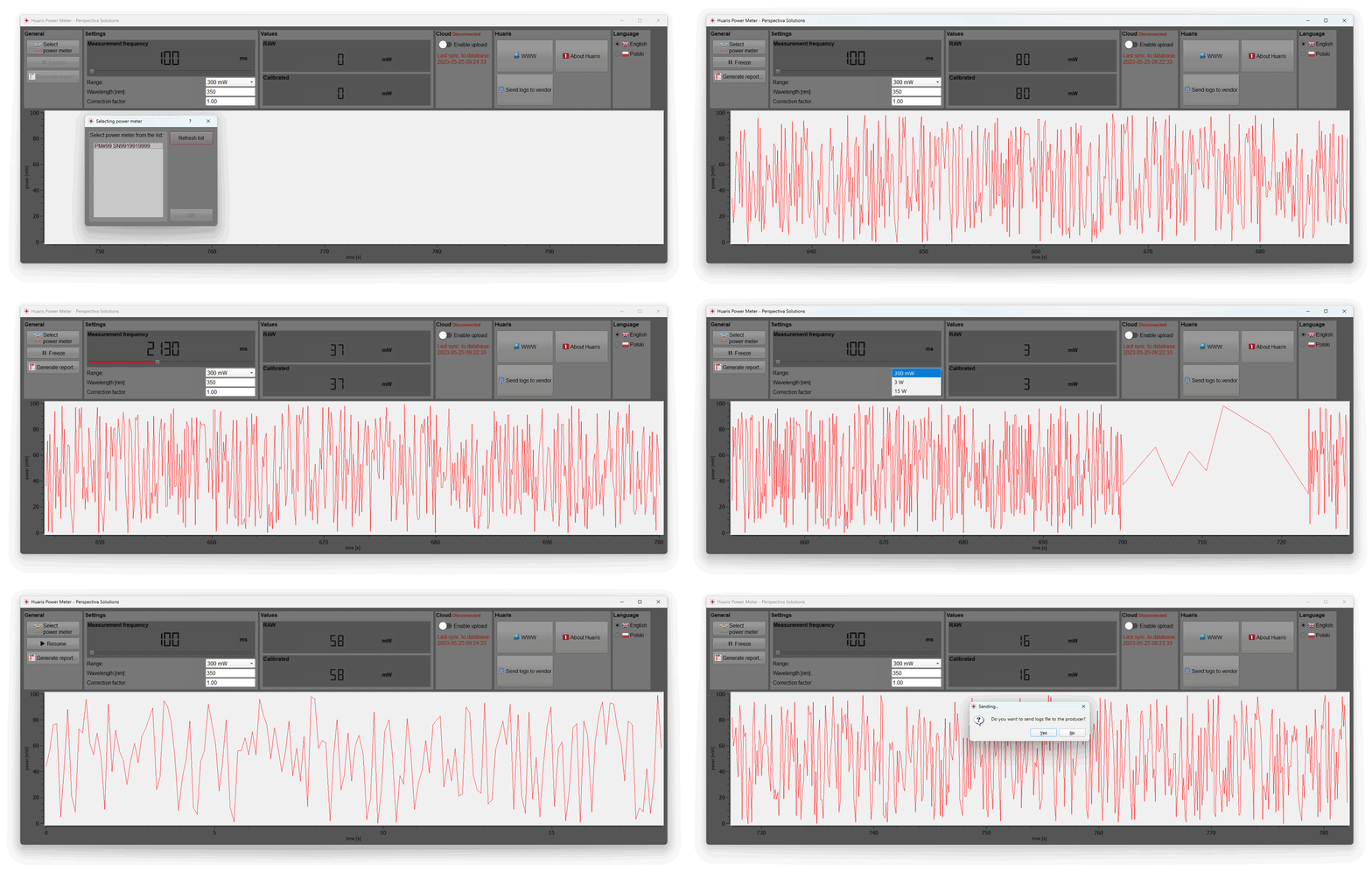
En la sección Configuración general de nuestro software Huaris Laser Power Meter, tiene la opción de seleccionar su dispositivo: el medidor de potencia láser. Elija su medidor de potencia preferido de nuestra gama de dispositivos de alta calidad para garantizar mediciones de potencia precisas y fiables.

Congelar en cualquier momento

El primer botón que analizaremos se llama «Freeze». Esta función le permite pausar la medición en cualquier momento y reanudarla más tarde. Además, tiene la posibilidad de generar un informe PDF que muestra los datos de medición visibles en el software.

Generación de informes PDF

Descubra el proceso de generación de informes PDF detallados con los datos de medición visibles dentro del software. Esta función le permite documentar y analizar sus mediciones de potencia de forma precisa y cómoda.

Configuración básica del medidor de potencia

Control de la medición mediante la optimización de la configuración

Tome el control total de sus mediciones: domine la optimización de la configuración en el software de gestión del medidor de potencia láser Huaris. Ajuste con precisión las opciones de control de medición para obtener lecturas de potencia exactas y precisas, garantizando un rendimiento óptimo de su medidor de potencia láser.

Frecuencia de medición

En la sección «Configuración», puede realizar varias modificaciones. En primer lugar, puede ajustar la frecuencia de medición, determinando cada cuánto tiempo se registra la potencia. Por ejemplo, un ajuste de 500 milisegundos significa que se mostrará un nuevo valor cada medio segundo en la sección correspondiente y se añadirá al gráfico.

Medición precisa de potencia con calibración de longitud de onda

Descubra la función de longitud de onda en el software de gestión del medidor de potencia láser Huaris. Calibre su medidor de potencia láser para longitudes de onda específicas, garantizando mediciones de potencia precisas adaptadas a las características de su láser.

Rango para la medición de potencia

También puede seleccionar el rango de medición de potencia, eligiendo entre opciones como 300 milivatios hasta 15 vatios. Seleccionar el rango adecuado es esencial para obtener lecturas precisas. Además, debe especificar la longitud de onda de su láser para mediciones exactas.

Factor de corrección

Una función destacada es el «Factor de corrección». Este factor corrige los valores proporcionados por el cabezal de medición. La parte superior, conocida como «Row», representa el valor bruto entregado al cabezal, mientras que el valor calibrado se obtiene multiplicando el valor «Row» por el factor de corrección. Este ajuste es especialmente útil cuando se utiliza un divisor de haz y permite observar la potencia exacta emitida por el láser.

Integración con analítica en la nube con IA

Analice los datos de potencia láser con Huaris AI Cloud

Explore la opción de enviar sus datos de medición a la plataforma en la nube de Huaris. Libere el potencial del almacenamiento de datos a largo plazo, la analítica con IA y las cómodas notificaciones de alarma. Al conectarse a Huaris Cloud, obtiene acceso a funcionalidades avanzadas como almacenamiento de datos a largo plazo, analítica con IA y alarmas. Podrá analizar los datos de potencia láser mediante algoritmos avanzados de inteligencia artificial.

Desbloquee potentes conocimientos: analice los datos de potencia láser con el sistema Huaris AI Cloud

Huaris AI Cloud ofrece potentes capacidades de análisis de datos, permitiéndole extraer información valiosa, identificar patrones y optimizar sus mediciones de potencia láser para mejorar el rendimiento. El sistema le permite analizar en profundidad los datos de potencia láser, identificar tendencias y obtener información clave sobre sus mediciones.

Desbloquee el potencial del análisis impulsado por IA con Huaris AI Cloud y lleve sus mediciones de potencia láser al siguiente nivel. Con funciones como la analítica con IA, puede extraer información significativa y optimizar el rendimiento de su láser para una mayor precisión y eficiencia.

No obstante, es importante tener en cuenta que su medidor de potencia debe añadirse al sistema en la nube para poder utilizar plenamente estas funciones.

// Mediciones de potencia láser

Beneficios de usar el software del medidor de potencia láser Huaris

A continuación, se presentan algunos beneficios de utilizar el software del medidor de potencia láser Huaris:

  • Medición precisa de potencia: el software Huaris proporciona mediciones precisas y fiables, lo que le permite determinar con exactitud la potencia de salida de su sistema láser.

  • Análisis avanzado de datos: el software ofrece sólidas capacidades de análisis de datos, permitiéndole analizar e interpretar eficazmente los datos de potencia láser. Obtenga información sobre tendencias de potencia, fluctuaciones y características de rendimiento de su láser.

  • Configuraciones personalizables: el software Huaris le permite personalizar diversos ajustes, como la frecuencia de medición, la selección de rango y los factores de corrección. Adapte el software a sus requisitos de medición específicos y obtenga resultados óptimos.

  • Informes en PDF: genere informes PDF detallados directamente desde el software, documentando sus datos de medición para su posterior análisis, uso compartido y registro.

  • Integración perfecta: el software Huaris se integra perfectamente con la plataforma en la nube de Huaris, proporcionando funcionalidades adicionales como almacenamiento de datos a largo plazo, analítica con IA y alarmas. Maximice las capacidades de su medidor de potencia láser con la integración en la nube.

  • Interfaz fácil de usar: el software cuenta con una interfaz intuitiva y fácil de usar, lo que facilita la navegación y el manejo. Dedique menos tiempo a la formación en software y más tiempo a mediciones precisas de potencia.

  • Solución de problemas y soporte: en caso de problemas o preguntas, Huaris ofrece soporte al cliente dedicado para ayudarle. Resuelva cualquier desafío relacionado con el software y garantice una experiencia fluida.

  • Actualizaciones continuas: benefíciese de actualizaciones y mejoras periódicas del software, asegurando el acceso a las últimas funciones y optimizaciones para un rendimiento óptimo.

// Preguntas frecuentes sobre medidores de potencia y energía láser

Lea las preguntas más frecuentes
sobre dispositivos y software de medición de potencia láser

What are the advantages of using software for laser power meter data management?

Using software for laser power meter data management offers several advantages. Firstly, it allows for efficient organization and storage of measurement data, making it easy to access and analyze. Secondly, software provides advanced data processing capabilities, enabling you to generate reports, perform data comparisons, and extract valuable insights. Additionally, software often integrates with other tools and systems, facilitating seamless workflow integration and enhancing overall efficiency in laser power measurement processes.

What is laser power meter software and how does it work?

Laser power meter software is a specialized program that is designed to work in conjunction with a laser power meter device. It enhances the functionality and capabilities of the power meter by providing advanced data analysis, visualization, and control features.

The software typically communicates with the laser power meter through a connection interface, such as USB or Ethernet. It allows users to view real-time measurements of laser power, monitor power fluctuations, and record data for further analysis.

One of the key functions of laser power meter software is data logging. It enables users to capture and store power measurements over time, allowing for long-term monitoring and analysis of power trends. The software may offer options to export the data in various formats for further processing or integration with other software tools.

Moreover, laser power meter software often provides additional features such as calibration, correction factors, and measurement settings customization. Users can calibrate the power meter using known reference standards to ensure accurate measurements. Correction factors can be applied to account for factors like beam shape or wavelength. The software also enables users to adjust measurement parameters, such as sampling rate or power range, based on their specific needs.

Furthermore, the software may offer graphical representations of power data, including real-time plots, histograms, or power profiles. These visualizations help users analyze power distributions, identify abnormalities, and make informed decisions regarding laser performance and safety.

Overall, laser power meter software plays a crucial role in maximizing the functionality and usability of laser power meter devices. It enables users to effectively monitor, analyze, and control laser power measurements, providing valuable insights for research, industrial applications, and laser safety compliance.

Which laser power meter software is the best for measuring power accurately?

The best laser power meter software for measuring power accurately depends on various factors, including the specific requirements of the user and the compatibility with the laser power meter device being used. There are several reputable software options available in the market that are known for their accuracy and reliability.

One highly regarded software is the Huaris laser power meter software. It is specifically designed to work seamlessly with Huaris laser power meter devices and offers advanced features for precise power measurements. The software provides a user-friendly interface, allowing for easy navigation and control of the power meter functionalities. It offers real-time monitoring of power measurements, data logging capabilities, and the generation of detailed reports.

What are the key features to look for in laser power meter software?

When looking for laser power meter software, there are several key features to consider:

1. Compatibility: Ensure that the software is compatible with your specific laser power meter device to ensure seamless integration and accurate measurements.

2. User-Friendly Interface: Look for software with an intuitive and easy-to-use interface, allowing for efficient navigation and control of the power meter functionalities.

3. Real-Time Monitoring: The software should provide real-time measurement capabilities, allowing you to monitor power levels continuously and make necessary adjustments.

4. Data Logging and Reporting: Look for software that offers data logging capabilities, allowing you to record and analyze power measurements over time. The ability to generate detailed reports with measurement data is also beneficial.

5. Customization Options: The software should provide flexibility in customizing measurement settings, such as frequency and range, to meet specific measurement requirements.

6. Calibration and Correction: Some software offers calibration features to ensure accurate power measurements. Look for software that allows for correction factors and compensation for various parameters.

7. Integration and Compatibility: Consider whether the software can integrate with other tools or platforms, such as cloud storage or analysis software, to enhance data management and analysis capabilities.

By considering these key features, you can select laser power meter software that meets your specific needs and enables accurate and efficient power measurements.

How to calibrate a laser power meter using software?

Calibrating a laser power meter using software typically involves the following steps:

1. Connect the power meter to the computer: Ensure that the power meter is properly connected to the computer via USB or any other supported interface.

2. Launch the software: Open the laser power meter software on your computer.

3. Access the calibration settings: Navigate to the calibration settings or options within the software. It may be under a dedicated menu or settings section.

4. Prepare a reference source: Have a known and stable laser or power source available as a reference for calibration. This reference source should have a well-documented power output.

5. Start the calibration process: Follow the instructions provided by the software to initiate the calibration process. This usually involves directing the power meter to the reference source and capturing the measurement.

6. Compare and adjust: The software will compare the measured value from the power meter with the known value of the reference source. Based on the comparison, the software may suggest or allow you to adjust calibration factors or coefficients.

7. Finalize calibration: Once the necessary adjustments have been made, save or apply the calibration settings within the software.

8. Verify calibration: After calibration, it is recommended to verify the accuracy of the power meter by measuring known power sources to ensure reliable and accurate measurements.

Note: The specific calibration process may vary depending on the laser power meter and software you are using. It is essential to consult the user manual or documentation provided by the manufacturer for detailed instructions on calibrating your specific laser power meter using the software.

How to analyze and visualize laser power data with software?

Analyzing and visualizing laser power data with software typically involves the following steps:

1. Import or load data: Use the software to import or load the laser power data you want to analyze. This data can be in various formats, such as CSV, Excel, or directly captured from the power meter.

2. Explore data visualization options: The software should provide various visualization tools and options, such as line graphs, histograms, or scatter plots. Explore these options to choose the most suitable visualization for your data.

3. Customize visualizations: Customize the visualizations by adjusting parameters like axes labels, colors, or data grouping. This helps in highlighting specific patterns or trends in the data.

4. Apply data analysis techniques: Utilize built-in analysis functions within the software, such as statistical calculations, averaging, or trend analysis. Apply these techniques to extract valuable insights from the laser power data.

5. Generate reports: Generate comprehensive reports summarizing the analyzed data and its visual representations. These reports can be saved or exported in different formats for further sharing or documentation purposes.

6. Compare and interpret results: Compare different datasets, analyze trends, and interpret the results to draw meaningful conclusions about the laser’s power performance or any relevant parameters.

7. Perform further analysis if needed: If the initial analysis raises additional questions or requires deeper investigation, use advanced analysis tools provided by the software or export the data to other specialized data analysis software.

Note: The specific analysis and visualization capabilities may vary depending on the laser power meter software you are using. It is recommended to consult the user manual or documentation provided by the software manufacturer for detailed instructions on analyzing and visualizing laser power data using their software.

Can laser power meter software integrate with other measurement devices?

Yes, laser power meter software can often integrate with other measurement devices. Integration capabilities may vary depending on the specific software and devices involved. However, many laser power meter software packages are designed to be compatible with various measurement instruments and devices, such as oscilloscopes, spectrometers, or beam profilers. This integration allows for synchronized data acquisition, combined analysis of multiple measurements, or even automated workflows between different instruments. It is advisable to consult the software documentation or contact the software provider to understand the integration options and compatibility with specific measurement devices.

What are the compatibility requirements for laser power meter software?

The compatibility requirements for laser power meter software may vary depending on the specific software. However, Huaris laser power meter is compatible with Windows operating system and utilizes a USB interface for seamless connectivity and data transfer. This ensures that users can easily connect their Huaris laser power meter to their Windows-based systems and utilize the software to measure and analyze laser power accurately.

What is a laser power meter and how does it work?

A laser power meter is a device used to measure the power or energy output of a laser beam. It works by capturing the laser beam and converting its energy into an electrical signal, which is then measured and displayed as a power value. Laser power meters employ various techniques such as thermopiles, photodiodes, or pyroelectric sensors to accurately measure the power of the laser beam. These devices are essential for ensuring proper laser performance, monitoring laser output, and optimizing laser applications across various industries.

How to choose the right laser power meter for my needs?

Choosing the right laser power meter requires considering several factors. First, determine the power range of your laser system to ensure the meter can handle the desired power levels. Next, consider the wavelength of your laser, as power meters are designed to work within specific wavelength ranges. Additionally, assess the measurement speed, accuracy, and resolution required for your application. Consider the type of detector technology, such as thermopiles or photodiodes, and whether you need a handheld, benchtop, or integrated system. Finally, take into account any specific features or accessories needed, such as data logging, connectivity options, or software compatibility. Evaluating these factors will help you select a laser power meter that meets your specific needs and provides accurate and reliable power measurements.

What are the benefits of using a laser power meter?

Using a laser power meter offers several benefits. Firstly, it allows you to accurately measure the power output of your laser, ensuring its performance meets the desired specifications. This is crucial for maintaining consistent and reliable results in various applications, including research, manufacturing, and medical procedures.

Secondly, a laser power meter helps you optimize the efficiency of your laser system. By monitoring the power output, you can identify any fluctuations or deviations that may indicate issues with the laser’s performance or alignment. This enables you to take corrective measures promptly, minimizing downtime and maximizing productivity.

Furthermore, a laser power meter provides valuable data for calibration and quality control purposes. You can compare the measured power output against the expected values, ensuring your laser operates within the desired range. This helps in maintaining the accuracy and precision of your laser system, which is particularly important in applications such as laser material processing and scientific experiments.

In summary, using a laser power meter offers the benefits of accurate power measurement, performance optimization, and quality control, contributing to improved efficiency, reliability, and precision in laser-based applications.

What are the key features to consider when purchasing a laser power meter?

When purchasing a laser power meter, there are several key features to consider:

1. Power Range: Ensure that the power meter can accurately measure the power levels within your specific range of interest. It should have a wide dynamic range and be capable of measuring both low and high power outputs.

2. Wavelength Compatibility: Verify that the power meter is compatible with the wavelength(s) of your laser. Different lasers emit light at specific wavelengths, and the power meter should be designed to measure power at those wavelengths accurately.

3. Measurement Accuracy: Look for a power meter with high accuracy and precision to ensure reliable and trustworthy measurements. Consider the specifications related to accuracy, uncertainty, and resolution provided by the manufacturer.

4. Response Time: The power meter’s response time determines how quickly it can provide accurate power readings. For lasers with rapid fluctuations or pulsed operation, a fast response time is crucial to capture the power variations accurately.

5. Data Logging and Connectivity: Check if the power meter offers data logging capabilities to record and analyze power measurements over time. Additionally, consider the connectivity options available, such as USB, Bluetooth, or wireless, to facilitate data transfer and integration with other devices or software.

6. User Interface: Evaluate the user interface of the power meter, ensuring it is intuitive and easy to navigate. Look for features like a clear display, accessible controls, and user-friendly software for efficient operation and data interpretation.

7. Calibration and Maintenance: Consider the availability of calibration services and the recommended calibration interval for the power meter. Additionally, assess the ease of maintenance and the availability of technical support from the manufacturer.

By considering these key features, you can make an informed decision and choose a laser power meter that meets your specific requirements, ensuring accurate and reliable power measurements for your laser system.

What are the common troubleshooting issues with laser power meters?

When using laser power meters, you may encounter some common troubleshooting issues. Here are a few examples:

1. Inconsistent Readings: If you notice inconsistent or fluctuating readings, check for any loose connections between the power meter and the laser source. Ensure that the optical components, such as the attenuator or beam sampler, are properly aligned and clean. Additionally, verify if there are any environmental factors affecting the stability of the laser beam, such as temperature or vibrations.

2. Zero Power Readings: If the power meter consistently displays zero power readings, ensure that the power meter is receiving an appropriate power input. Check the power source, cables, and connections to confirm proper power delivery. Additionally, inspect the detector surface for any contamination or damage that may be affecting its sensitivity.

3. Calibration Issues: If you suspect calibration issues, first check if the power meter is within the recommended calibration period. Consider sending the power meter to an accredited calibration laboratory for recalibration if necessary. It’s also essential to follow the manufacturer’s calibration instructions and procedures accurately.

4. Software Compatibility: If you experience difficulties with the power meter software, ensure that your computer meets the software’s system requirements. Verify if you have installed the latest software version provided by the manufacturer. In case of persistent issues, contact the manufacturer’s technical support for assistance.

5. Unusual Error Messages: If you encounter error messages or warnings displayed by the power meter or software, consult the user manual or documentation for guidance. The error message may indicate specific issues like communication errors, sensor overload, or out-of-range measurements. Follow the recommended troubleshooting steps provided by the manufacturer.

In any troubleshooting situation, it’s recommended to refer to the user manual or contact the manufacturer’s technical support for detailed guidance. They can provide specific troubleshooting steps based on the particular model and help resolve any issues you may encounter with your laser power meter.

Can a laser power meter be used for different types of lasers?

Yes, laser power meters can be used for different types of lasers. However, it is important to consider the specifications and compatibility of the power meter with the specific laser you intend to measure.

When choosing a laser power meter, ensure that it supports the wavelength range of your laser. Laser power meters are designed to work with specific wavelength ranges, so it’s crucial to select a power meter that is compatible with your laser’s wavelength.

Additionally, consider the power range of your laser. Laser power meters have different power measurement capabilities, and it’s essential to choose a power meter that can accurately measure the power levels of your laser. Ensure that the power meter’s maximum power rating is higher than the power output of your laser to avoid any damage to the power meter.

Furthermore, take into account the beam size and shape of your laser. Some power meters are designed to measure the power of a specific beam size or shape, while others offer adjustable apertures or beam profiling capabilities. Choose a power meter that can accommodate the beam size and shape of your laser for accurate measurements.

Lastly, consider the type of laser you are using, such as continuous wave (CW) lasers or pulsed lasers. Different power meters are optimized for specific laser types, so select a power meter that is suitable for the type of laser you are working with.

By considering these factors and ensuring compatibility, you can effectively use a laser power meter for different types of lasers, allowing you to accurately measure and monitor their power output.

Are there any software tools for automating laser power measurements?

Yes, there are software tools available for automating laser power measurements. These tools are designed to streamline the measurement process and increase efficiency. They often offer features such as scheduled measurements, data logging, and automated data analysis. By leveraging these tools, you can save time and ensure consistent and accurate measurements.

How to troubleshoot common issues with laser power meter software?

If you encounter common issues with laser power meter software, here are a few troubleshooting steps you can take:

1. Check the connections: Ensure that the power meter is properly connected to the computer via USB and that all connections are secure.

2. Update the software: Make sure you have the latest version of the software installed. Check for updates on the manufacturer’s website and install any available patches or fixes.

3. Restart the software and device: Close the software, disconnect the power meter, and restart both the software and the device. This can often resolve minor software glitches.

4. Verify compatibility: Ensure that your operating system meets the software’s compatibility requirements. Some software may only work with specific versions of Windows or other operating systems.

5. Contact support: If the issue persists, reach out to the software manufacturer’s support team for assistance. They can provide further guidance and troubleshooting steps specific to the software.

Remember to consult the user manual or documentation provided with the software for additional troubleshooting tips and instructions.

Contact Us

We would be grateful for your feedback about the product. Also, if you would like to receive quotation for our product, please use the contact form below.

Our Office in Poland

Perspectiva Solutions
Młyńska 27 St.
22-400 Zamość, Poland

We work on working days CET (Central European Standard Time) in the following hours:

Md. – Fr. 8:00 – 16:00
Sat. – Sun. – Closed

Free Consultation

Huaris inquiries:
Phone inquiries:

Our distributors

    Query for Huaris system: