Over 10 years we help companies reach their financial and branding goals. Engitech is a values-driven technology agency dedicated.

Gallery

Contacts

411 University St, Seattle, USA

engitech@oceanthemes.net

+1 -800-456-478-23

Huaris laser power meter managment software for HS2515-U

Software Huaris Laser Power Meter Management 1.0

Oplev styrken ved avanceret software til måling af lasereffekt. Med vores Huaris Laser Effektmåler Software kan du løfte dine målinger til et nyt niveau. Den intuitive brugerflade og de robuste funktioner gør softwaren til et værdifuldt værktøj for både professionelle og entusiaster.

Maksimér din lasers potentiale med Huaris Effektmåler Management Software

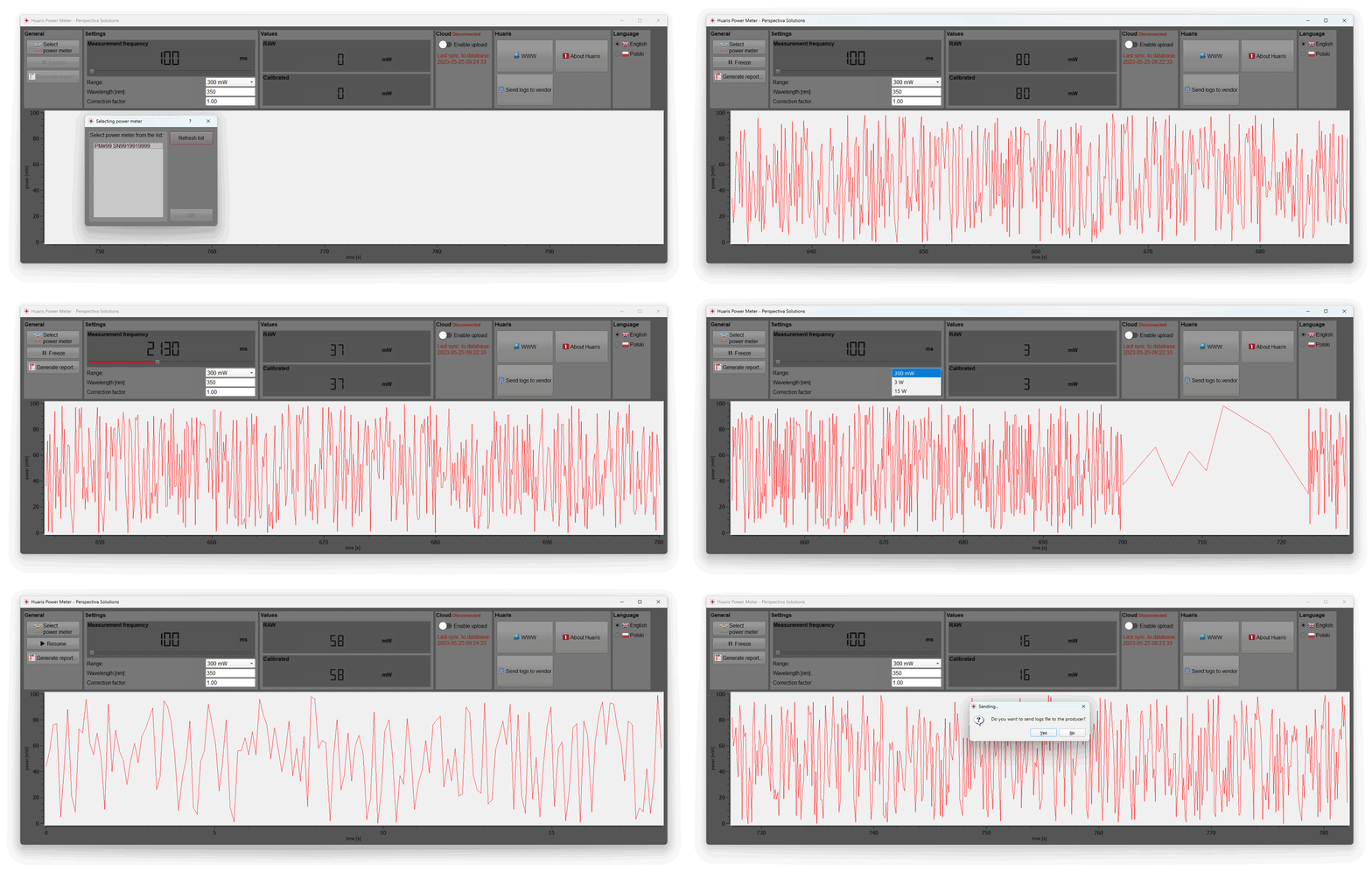
Huaris laser effektmåler-software er designet til at levere en intuitiv grænseflade til styring og overvågning af laser effektmålerens ydeevne. Med denne software kan brugere nemt konfigurere effektmålerens indstillinger, overvåge effektmålinger i realtid og analysere data til videre behandling. Softwaren tilbyder også avancerede funktioner såsom automatisk kalibrering, der muliggør mere nøjagtige målinger og reducerer risikoen for fejl. Derudover kan data gemmes i overskuelige og tydelige PDF-rapporter med dato, tidspunkt og andre vigtige oplysninger.

Huaris videovejledning

Vejledning til Huaris laser effektmåler

Ønsker du at forbedre din viden og færdigheder i brugen af Huaris laser effektmåler og den tilhørende software?

I denne vejledningsvideo dykker vi ned i de tekniske aspekter af Huaris laser effektmåler og dens kraftfulde software. Lær, hvordan du måler effekt nøjagtigt, kalibrerer laser effektmåleren for præcise aflæsninger, analyserer lasereffektdata effektivt og fejlfinder eventuelle problemer, der kan opstå med softwaren.

Ved at se vores vejledningsvideo får du værdifuld indsigt i, hvordan du udnytter laser effektmåler-softwaren fuldt ud. Lær at optimere funktionerne, anvende avancerede muligheder og overvinde almindelige udfordringer forbundet med måling af lasereffekt.

Gå ikke glip af denne mulighed for at udvide din forståelse af laser effektmåler-teknologi. Se vejledningen nu og opdag hemmelighederne bag præcis effektmåling, dataanalyse og fejlfinding i laser effektmåler-softwaren.

Frigør det fulde potentiale i din Huaris laser effektmåler og bliv en kompetent bruger. Deltag på vores YouTube-kanal og styrk dig selv med den viden og de færdigheder, der kræves for at excellere inden for måling af lasereffekt.

// Kontakt os! Vi er klar til at besvare dine spørgsmål 24/7

BRUG FOR EN KONSULTATION?

Generelle indstillinger

Grundlæggende funktioner i sektionen Generelle indstillinger

I sektionen Generelle indstillinger i Huaris Laser Effektmåler Software har du mulighed for at vælge din enhed – laser effektmåleren. Vælg din foretrukne effektmåler fra vores udvalg af højkvalitetsenheder for at sikre nøjagtige og pålidelige effektmålinger.

Frys når som helst

Den første knap, vi gennemgår, hedder “Freeze”. Denne funktion giver dig mulighed for at sætte målingen på pause på ethvert tidspunkt og genoptage den senere. Derudover kan du generere en PDF-rapport, som viser de måledata, der er synlige i softwaren.

Generering af PDF-rapporter

Udforsk processen med at generere detaljerede PDF-rapporter med måledata, der vises i softwaren. Denne funktion gør det muligt at dokumentere og analysere dine effektmålinger præcist og bekvemt.

Grundlæggende indstillinger for effektmåleren

Målekontrol via optimering af indstillinger

Tag fuld kontrol over dine målinger: Få styr på indstillingsoptimering i Huaris Laser Effektmåler Management Software. Finjustér dine målekontrolmuligheder for at opnå præcise og nøjagtige effektmålinger og sikre optimal ydeevne af din laser effektmåler.

Målefrekvens

I sektionen “Indstillinger” kan du foretage flere justeringer. Først kan du indstille målefrekvensen, som bestemmer, hvor ofte effekten registreres. For eksempel betyder en indstilling på 500 millisekunder, at en ny værdi vises hvert halve sekund i den efterfølgende sektion og tilføjes til grafen.

Præcis effektmåling med bølgelængdekalibrering

Udforsk bølgelængdefunktionen i Huaris Laser Effektmåler Management Software. Kalibrér din laser effektmåler til specifikke bølgelængder for at sikre præcise effektmålinger, der er tilpasset din lasers karakteristika.

Område for effektmåling

Du kan også vælge området for effektmålingen, f.eks. fra 300 milliwatt til 15 watt. Valg af det korrekte område er afgørende for nøjagtige målinger. Derudover skal du angive din lasers bølgelængde for at sikre præcise resultater.

Korrektionsfaktor

En vigtig funktion er “Korrektionsfaktor”. Denne faktor korrigerer de værdier, der leveres af målehovedet. Den øverste del, kaldet “Row”, repræsenterer råværdien, som leveres til hovedet, mens den kalibrerede værdi opnås ved at multiplicere “Row”-værdien med korrektionsfaktoren. Denne justering er særligt nyttig ved anvendelse af en stråledeler og gør det muligt at observere den præcise effekt, som udsendes af laseren.

AI Cloud Analytics-integration

Analyser lasereffektdata med Huaris AI Cloud

Udforsk muligheden for at sende dine måledata til Huaris’ cloud-platform. Udnyt potentialet i langtidsdatalagring, AI-analyse og praktiske alarmnotifikationer. Ved at forbinde til Huaris Cloud får du adgang til udvidede funktioner såsom langtidsdatalagring, AI-analyse og alarmer. Du får mulighed for at analysere dine lasereffektdata ved hjælp af avancerede AI-algoritmer.

Frigør kraftfuld indsigt: Analyser lasereffektdata med Huaris AI Cloud-system

Huaris AI Cloud tilbyder avancerede dataanalysefunktioner, der gør det muligt at udtrække værdifuld indsigt, identificere mønstre og optimere dine målinger af lasereffekt for forbedret ydeevne. Systemet giver dig mulighed for at analysere lasereffektdata i dybden, identificere trends og opnå værdifuld indsigt i dine effektmålinger.

Frigør potentialet i AI-drevet analyse med Huaris AI Cloud, og løft dine målinger af lasereffekt til næste niveau. Med funktioner som AI-analyse kan du udtrække meningsfuld information og optimere din lasers ydeevne for øget præcision og effektivitet.

Det er dog vigtigt at bemærke, at din effektmåler skal være tilføjet cloud-systemet for at kunne udnytte disse funktioner fuldt ud.

// Måling af lasereffekt

Fordele ved at bruge Huaris laser effektmåler-software

Her er nogle af fordelene ved at bruge Huaris laser effektmåler-software:

  • Nøjagtig effektmåling: Huaris software leverer præcise og pålidelige målinger, så du nøjagtigt kan bestemme effekten fra dit lasersystem.

  • Avanceret dataanalyse: Softwaren tilbyder kraftfulde dataanalysefunktioner, der gør det muligt at analysere og fortolke lasereffektdata effektivt. Få indsigt i effekttrends, udsving og lasersystemets ydeevne.

  • Brugerdefinerbare indstillinger: Huaris software giver mulighed for at tilpasse indstillinger såsom målefrekvens, valg af måleområde og korrektionsfaktorer. Tilpas softwaren til dine specifikke målebehov og opnå optimale resultater.

  • PDF-rapportering: Generér detaljerede PDF-rapporter direkte fra softwaren, så dine måledata kan dokumenteres til videre analyse, deling og arkivering.

  • Problemfri integration: Huaris software integreres problemfrit med Huaris cloud-platformen og tilbyder yderligere funktioner såsom langtidsdatalagring, AI-analyse og alarmer. Maksimér din laser effektmålers muligheder med cloud-integration.

  • Brugervenlig grænseflade: Softwaren har en intuitiv og brugervenlig grænseflade, der gør den nem at navigere og anvende. Brug mindre tid på softwareoplæring og mere tid på præcise effektmålinger.

  • Fejlfinding og support: Ved eventuelle problemer eller spørgsmål tilbyder Huaris dedikeret kundesupport. Få hjælp til softwareudfordringer og sikr en problemfri oplevelse.

  • Løbende opdateringer: Drag fordel af regelmæssige softwareopdateringer og forbedringer, så du altid har adgang til de nyeste funktioner og optimeringer for optimal ydeevne.

// FAQ laser effekt- og energimålere

Læs de mest stillede spørgsmål
om lasereffekt-enheder og software

What are the advantages of using software for laser power meter data management?

Using software for laser power meter data management offers several advantages. Firstly, it allows for efficient organization and storage of measurement data, making it easy to access and analyze. Secondly, software provides advanced data processing capabilities, enabling you to generate reports, perform data comparisons, and extract valuable insights. Additionally, software often integrates with other tools and systems, facilitating seamless workflow integration and enhancing overall efficiency in laser power measurement processes.

What is laser power meter software and how does it work?

Laser power meter software is a specialized program that is designed to work in conjunction with a laser power meter device. It enhances the functionality and capabilities of the power meter by providing advanced data analysis, visualization, and control features.

The software typically communicates with the laser power meter through a connection interface, such as USB or Ethernet. It allows users to view real-time measurements of laser power, monitor power fluctuations, and record data for further analysis.

One of the key functions of laser power meter software is data logging. It enables users to capture and store power measurements over time, allowing for long-term monitoring and analysis of power trends. The software may offer options to export the data in various formats for further processing or integration with other software tools.

Moreover, laser power meter software often provides additional features such as calibration, correction factors, and measurement settings customization. Users can calibrate the power meter using known reference standards to ensure accurate measurements. Correction factors can be applied to account for factors like beam shape or wavelength. The software also enables users to adjust measurement parameters, such as sampling rate or power range, based on their specific needs.

Furthermore, the software may offer graphical representations of power data, including real-time plots, histograms, or power profiles. These visualizations help users analyze power distributions, identify abnormalities, and make informed decisions regarding laser performance and safety.

Overall, laser power meter software plays a crucial role in maximizing the functionality and usability of laser power meter devices. It enables users to effectively monitor, analyze, and control laser power measurements, providing valuable insights for research, industrial applications, and laser safety compliance.

Which laser power meter software is the best for measuring power accurately?

The best laser power meter software for measuring power accurately depends on various factors, including the specific requirements of the user and the compatibility with the laser power meter device being used. There are several reputable software options available in the market that are known for their accuracy and reliability.

One highly regarded software is the Huaris laser power meter software. It is specifically designed to work seamlessly with Huaris laser power meter devices and offers advanced features for precise power measurements. The software provides a user-friendly interface, allowing for easy navigation and control of the power meter functionalities. It offers real-time monitoring of power measurements, data logging capabilities, and the generation of detailed reports.

What are the key features to look for in laser power meter software?

When looking for laser power meter software, there are several key features to consider:

1. Compatibility: Ensure that the software is compatible with your specific laser power meter device to ensure seamless integration and accurate measurements.

2. User-Friendly Interface: Look for software with an intuitive and easy-to-use interface, allowing for efficient navigation and control of the power meter functionalities.

3. Real-Time Monitoring: The software should provide real-time measurement capabilities, allowing you to monitor power levels continuously and make necessary adjustments.

4. Data Logging and Reporting: Look for software that offers data logging capabilities, allowing you to record and analyze power measurements over time. The ability to generate detailed reports with measurement data is also beneficial.

5. Customization Options: The software should provide flexibility in customizing measurement settings, such as frequency and range, to meet specific measurement requirements.

6. Calibration and Correction: Some software offers calibration features to ensure accurate power measurements. Look for software that allows for correction factors and compensation for various parameters.

7. Integration and Compatibility: Consider whether the software can integrate with other tools or platforms, such as cloud storage or analysis software, to enhance data management and analysis capabilities.

By considering these key features, you can select laser power meter software that meets your specific needs and enables accurate and efficient power measurements.

How to calibrate a laser power meter using software?

Calibrating a laser power meter using software typically involves the following steps:

1. Connect the power meter to the computer: Ensure that the power meter is properly connected to the computer via USB or any other supported interface.

2. Launch the software: Open the laser power meter software on your computer.

3. Access the calibration settings: Navigate to the calibration settings or options within the software. It may be under a dedicated menu or settings section.

4. Prepare a reference source: Have a known and stable laser or power source available as a reference for calibration. This reference source should have a well-documented power output.

5. Start the calibration process: Follow the instructions provided by the software to initiate the calibration process. This usually involves directing the power meter to the reference source and capturing the measurement.

6. Compare and adjust: The software will compare the measured value from the power meter with the known value of the reference source. Based on the comparison, the software may suggest or allow you to adjust calibration factors or coefficients.

7. Finalize calibration: Once the necessary adjustments have been made, save or apply the calibration settings within the software.

8. Verify calibration: After calibration, it is recommended to verify the accuracy of the power meter by measuring known power sources to ensure reliable and accurate measurements.

Note: The specific calibration process may vary depending on the laser power meter and software you are using. It is essential to consult the user manual or documentation provided by the manufacturer for detailed instructions on calibrating your specific laser power meter using the software.

How to analyze and visualize laser power data with software?

Analyzing and visualizing laser power data with software typically involves the following steps:

1. Import or load data: Use the software to import or load the laser power data you want to analyze. This data can be in various formats, such as CSV, Excel, or directly captured from the power meter.

2. Explore data visualization options: The software should provide various visualization tools and options, such as line graphs, histograms, or scatter plots. Explore these options to choose the most suitable visualization for your data.

3. Customize visualizations: Customize the visualizations by adjusting parameters like axes labels, colors, or data grouping. This helps in highlighting specific patterns or trends in the data.

4. Apply data analysis techniques: Utilize built-in analysis functions within the software, such as statistical calculations, averaging, or trend analysis. Apply these techniques to extract valuable insights from the laser power data.

5. Generate reports: Generate comprehensive reports summarizing the analyzed data and its visual representations. These reports can be saved or exported in different formats for further sharing or documentation purposes.

6. Compare and interpret results: Compare different datasets, analyze trends, and interpret the results to draw meaningful conclusions about the laser’s power performance or any relevant parameters.

7. Perform further analysis if needed: If the initial analysis raises additional questions or requires deeper investigation, use advanced analysis tools provided by the software or export the data to other specialized data analysis software.

Note: The specific analysis and visualization capabilities may vary depending on the laser power meter software you are using. It is recommended to consult the user manual or documentation provided by the software manufacturer for detailed instructions on analyzing and visualizing laser power data using their software.

Can laser power meter software integrate with other measurement devices?

Yes, laser power meter software can often integrate with other measurement devices. Integration capabilities may vary depending on the specific software and devices involved. However, many laser power meter software packages are designed to be compatible with various measurement instruments and devices, such as oscilloscopes, spectrometers, or beam profilers. This integration allows for synchronized data acquisition, combined analysis of multiple measurements, or even automated workflows between different instruments. It is advisable to consult the software documentation or contact the software provider to understand the integration options and compatibility with specific measurement devices.

What are the compatibility requirements for laser power meter software?

The compatibility requirements for laser power meter software may vary depending on the specific software. However, Huaris laser power meter is compatible with Windows operating system and utilizes a USB interface for seamless connectivity and data transfer. This ensures that users can easily connect their Huaris laser power meter to their Windows-based systems and utilize the software to measure and analyze laser power accurately.

What is a laser power meter and how does it work?

A laser power meter is a device used to measure the power or energy output of a laser beam. It works by capturing the laser beam and converting its energy into an electrical signal, which is then measured and displayed as a power value. Laser power meters employ various techniques such as thermopiles, photodiodes, or pyroelectric sensors to accurately measure the power of the laser beam. These devices are essential for ensuring proper laser performance, monitoring laser output, and optimizing laser applications across various industries.

How to choose the right laser power meter for my needs?

Choosing the right laser power meter requires considering several factors. First, determine the power range of your laser system to ensure the meter can handle the desired power levels. Next, consider the wavelength of your laser, as power meters are designed to work within specific wavelength ranges. Additionally, assess the measurement speed, accuracy, and resolution required for your application. Consider the type of detector technology, such as thermopiles or photodiodes, and whether you need a handheld, benchtop, or integrated system. Finally, take into account any specific features or accessories needed, such as data logging, connectivity options, or software compatibility. Evaluating these factors will help you select a laser power meter that meets your specific needs and provides accurate and reliable power measurements.

What are the benefits of using a laser power meter?

Using a laser power meter offers several benefits. Firstly, it allows you to accurately measure the power output of your laser, ensuring its performance meets the desired specifications. This is crucial for maintaining consistent and reliable results in various applications, including research, manufacturing, and medical procedures.

Secondly, a laser power meter helps you optimize the efficiency of your laser system. By monitoring the power output, you can identify any fluctuations or deviations that may indicate issues with the laser’s performance or alignment. This enables you to take corrective measures promptly, minimizing downtime and maximizing productivity.

Furthermore, a laser power meter provides valuable data for calibration and quality control purposes. You can compare the measured power output against the expected values, ensuring your laser operates within the desired range. This helps in maintaining the accuracy and precision of your laser system, which is particularly important in applications such as laser material processing and scientific experiments.

In summary, using a laser power meter offers the benefits of accurate power measurement, performance optimization, and quality control, contributing to improved efficiency, reliability, and precision in laser-based applications.

What are the key features to consider when purchasing a laser power meter?

When purchasing a laser power meter, there are several key features to consider:

1. Power Range: Ensure that the power meter can accurately measure the power levels within your specific range of interest. It should have a wide dynamic range and be capable of measuring both low and high power outputs.

2. Wavelength Compatibility: Verify that the power meter is compatible with the wavelength(s) of your laser. Different lasers emit light at specific wavelengths, and the power meter should be designed to measure power at those wavelengths accurately.

3. Measurement Accuracy: Look for a power meter with high accuracy and precision to ensure reliable and trustworthy measurements. Consider the specifications related to accuracy, uncertainty, and resolution provided by the manufacturer.

4. Response Time: The power meter’s response time determines how quickly it can provide accurate power readings. For lasers with rapid fluctuations or pulsed operation, a fast response time is crucial to capture the power variations accurately.

5. Data Logging and Connectivity: Check if the power meter offers data logging capabilities to record and analyze power measurements over time. Additionally, consider the connectivity options available, such as USB, Bluetooth, or wireless, to facilitate data transfer and integration with other devices or software.

6. User Interface: Evaluate the user interface of the power meter, ensuring it is intuitive and easy to navigate. Look for features like a clear display, accessible controls, and user-friendly software for efficient operation and data interpretation.

7. Calibration and Maintenance: Consider the availability of calibration services and the recommended calibration interval for the power meter. Additionally, assess the ease of maintenance and the availability of technical support from the manufacturer.

By considering these key features, you can make an informed decision and choose a laser power meter that meets your specific requirements, ensuring accurate and reliable power measurements for your laser system.

What are the common troubleshooting issues with laser power meters?

When using laser power meters, you may encounter some common troubleshooting issues. Here are a few examples:

1. Inconsistent Readings: If you notice inconsistent or fluctuating readings, check for any loose connections between the power meter and the laser source. Ensure that the optical components, such as the attenuator or beam sampler, are properly aligned and clean. Additionally, verify if there are any environmental factors affecting the stability of the laser beam, such as temperature or vibrations.

2. Zero Power Readings: If the power meter consistently displays zero power readings, ensure that the power meter is receiving an appropriate power input. Check the power source, cables, and connections to confirm proper power delivery. Additionally, inspect the detector surface for any contamination or damage that may be affecting its sensitivity.

3. Calibration Issues: If you suspect calibration issues, first check if the power meter is within the recommended calibration period. Consider sending the power meter to an accredited calibration laboratory for recalibration if necessary. It’s also essential to follow the manufacturer’s calibration instructions and procedures accurately.

4. Software Compatibility: If you experience difficulties with the power meter software, ensure that your computer meets the software’s system requirements. Verify if you have installed the latest software version provided by the manufacturer. In case of persistent issues, contact the manufacturer’s technical support for assistance.

5. Unusual Error Messages: If you encounter error messages or warnings displayed by the power meter or software, consult the user manual or documentation for guidance. The error message may indicate specific issues like communication errors, sensor overload, or out-of-range measurements. Follow the recommended troubleshooting steps provided by the manufacturer.

In any troubleshooting situation, it’s recommended to refer to the user manual or contact the manufacturer’s technical support for detailed guidance. They can provide specific troubleshooting steps based on the particular model and help resolve any issues you may encounter with your laser power meter.

Can a laser power meter be used for different types of lasers?

Yes, laser power meters can be used for different types of lasers. However, it is important to consider the specifications and compatibility of the power meter with the specific laser you intend to measure.

When choosing a laser power meter, ensure that it supports the wavelength range of your laser. Laser power meters are designed to work with specific wavelength ranges, so it’s crucial to select a power meter that is compatible with your laser’s wavelength.

Additionally, consider the power range of your laser. Laser power meters have different power measurement capabilities, and it’s essential to choose a power meter that can accurately measure the power levels of your laser. Ensure that the power meter’s maximum power rating is higher than the power output of your laser to avoid any damage to the power meter.

Furthermore, take into account the beam size and shape of your laser. Some power meters are designed to measure the power of a specific beam size or shape, while others offer adjustable apertures or beam profiling capabilities. Choose a power meter that can accommodate the beam size and shape of your laser for accurate measurements.

Lastly, consider the type of laser you are using, such as continuous wave (CW) lasers or pulsed lasers. Different power meters are optimized for specific laser types, so select a power meter that is suitable for the type of laser you are working with.

By considering these factors and ensuring compatibility, you can effectively use a laser power meter for different types of lasers, allowing you to accurately measure and monitor their power output.

Are there any software tools for automating laser power measurements?

Yes, there are software tools available for automating laser power measurements. These tools are designed to streamline the measurement process and increase efficiency. They often offer features such as scheduled measurements, data logging, and automated data analysis. By leveraging these tools, you can save time and ensure consistent and accurate measurements.

How to troubleshoot common issues with laser power meter software?

If you encounter common issues with laser power meter software, here are a few troubleshooting steps you can take:

1. Check the connections: Ensure that the power meter is properly connected to the computer via USB and that all connections are secure.

2. Update the software: Make sure you have the latest version of the software installed. Check for updates on the manufacturer’s website and install any available patches or fixes.

3. Restart the software and device: Close the software, disconnect the power meter, and restart both the software and the device. This can often resolve minor software glitches.

4. Verify compatibility: Ensure that your operating system meets the software’s compatibility requirements. Some software may only work with specific versions of Windows or other operating systems.

5. Contact support: If the issue persists, reach out to the software manufacturer’s support team for assistance. They can provide further guidance and troubleshooting steps specific to the software.

Remember to consult the user manual or documentation provided with the software for additional troubleshooting tips and instructions.

Contact Us

We would be grateful for your feedback about the product. Also, if you would like to receive quotation for our product, please use the contact form below.

Our Office in Poland

Perspectiva Solutions
Młyńska 27 St.
22-400 Zamość, Poland

We work on working days CET (Central European Standard Time) in the following hours:

Md. – Fr. 8:00 – 16:00
Sat. – Sun. – Closed

Free Consultation

Huaris inquiries:
Phone inquiries:

Our distributors

    Query for Huaris system: